
Digital Microscope Tool Tutorial
A digital microscope, like a standard microscope, makes it easier to inspect small objects. This is very useful for precision work in textiles, electronics, jewelry, machining, and elsewhere.
Our digital microscope includes a built-in display and can take pictures and video as you work!
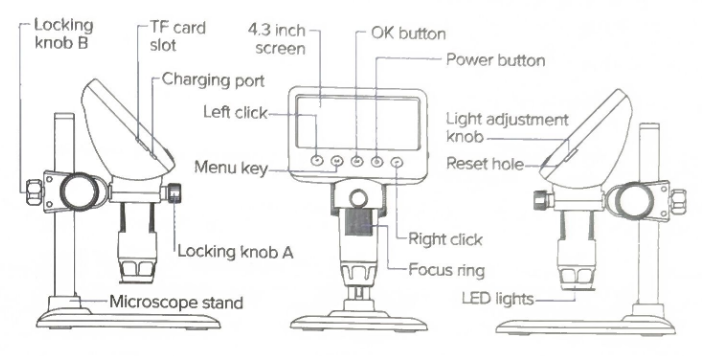
Troubleshooting
| Problem | Solution |
| Device frozen | Press the "reset hole" with a fine needle or pin to force a shutdown |
| Blurry image | Rotate the focus ring until the image clears |
Special Setups
PC Connection
Connect a USB cable between a computer's USB port and the charging port on the microscope to allow direct transfer of data to a PC. For Windows computers, the manufacturer recommends downloading and installing a custom application from this zip file: camera.zip
No Comments