
Multimeter Tool Tutorial
Multimeters are the workhorse of the electronics measurement world. They can perform three basic measurements: Voltage, Resistance, and Current. Many multimeters have extra measurement features such as capacitance, a continuity tester, and diode tester. The difference between a handheld multimeter and our desktop multimeter is that the desktop multimeter is much
more accurate and has more features than the handheld multimeter, including four wire measurements.
The meter uses probes, also called leads, (the red and black wires) to make contact with the circuit you are measuring.
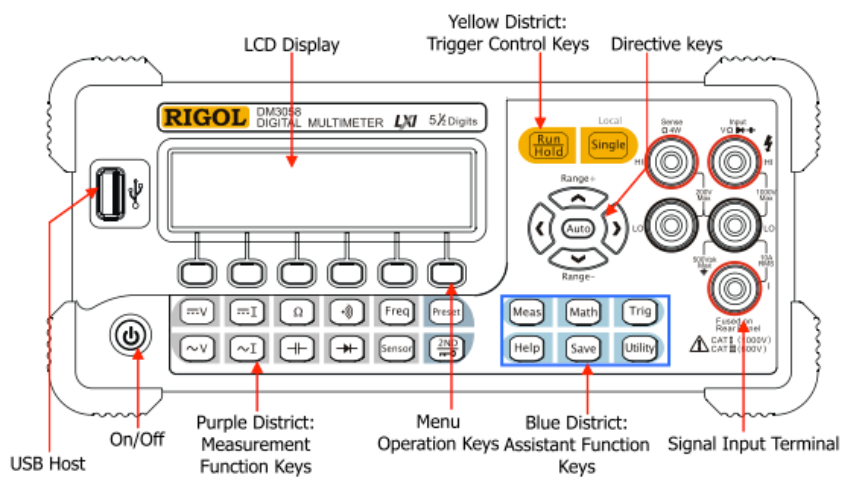
Controls
The primary controls you will use on the desktop Rigol DM3058 are:
• On/Off Button
• Measurement Function Keys
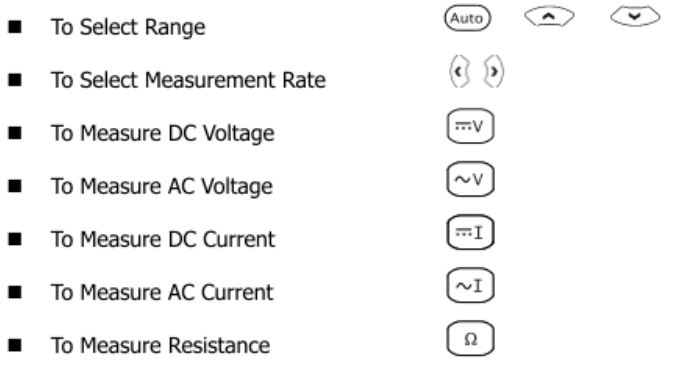
DC Voltage Measurement
Voltage is measured in volts (V). These instructions use a battery as an example system to measure:
- Turn on the desktop multimeter and press the DC Voltage button and the Auto button.
- Take the leads from the handheld multimeter and touch the red probe to the positive end of the battery and the black probe to the negative end of the battery. The meter should display a value between 1.2 and 1.6 depending on the charge of the battery.
- Now touch the black probe to the positive end of the battery and the red probe to the negative end of the battery. The multimeter should display a value between -1.2 and -1.6, this shows how these are relative measurements and depending on where you place the probes you can have different values.
Resistance Measurement
Resistance is how much a measured component resists the flow of electricity and is measured in ohms (Ω). Note that the desktop multimeter is auto-ranging, so any resistance value can be measured when in "Ohm" mode.
- Take a bundle of 10k resistors from the resistor pile. If the color-coding on the resistors are the same that means the resistors are the same value, but we can test that with our multimeter.
- Press the ohm button on the multimeter to enter resistance measurement mode.
- Touch the probes to each end of one of the resistors and wait for the shown value to stabilize. This is the measured resistance.
Current Measurement
Current measurements measure how much energy is being used in a circuit and is measured in amperes (A). Current measurement is different from voltage and resistance measurements in two main ways:
- The circuit must be actively running while you make the measurement, such as having a light lit or motor running.
- The multimeter replaces a wire in the circuit so that the current flows through the multimeter.
If you try to measure too high of current you can blow a fuse in the multimeter which then needs to be replaced.
- On the multimeter, press the measure DC current button.
- Refer to the Bench Power Supply Tool Tutorial to set up a simple DC circuit running through a resistor (e.g. 3V running through a 1kOhm resistor)
- Disconnect one side of the resistor and touch the probes to each end. The multimeter will display the current flowing in
the circuit. - Adjust the voltage on the power supply and see how the current changes. Avoid going higher than 100mA.
Cleanup
- Turn the multimeter off.
- Gently wind the probes and wires so there are no tight bends in the wire that could break the wire over time.
- Clean up the table and floor around where you worked.
No Comments