
CO Detector, Smoke Detector, and Thermostat Testing
The carbon monoxide detector is a small white plastic device located on the interior wall of the custodial room just to the right of the door.
Test CO Detector
Tool report: https://airtable.com/appbIlORlmbIxNU1L/shrluff2WSzy8c3xd
Vacuum CO Detector Grate
Use a shop vac to vacuum out any debris from the plastic grate on the carbon monoxide detector.
Do not use the shop vac assigned to the jewelry area. (The jewelry area shop vac should only be used for metals.)
Test Smoke Detectors
- Announce on the discord #general channel that fire alarms will be tested
- Alert all members in the shop that fire alarms will be tested
- Test each fire alarm by pressing the "test" button - this will produce several loud beeps:
- One in the conference room
- One in each bathroom
- One above the electronics bench in the studio
- One in the design classroom
- One in the staff room
- One in the custodial room
- For any alarms that fail to test, replace their battery, retest, and file a tool report (tagging the "Facilities" tool) with details.
Check Thermostat Backup Batteries
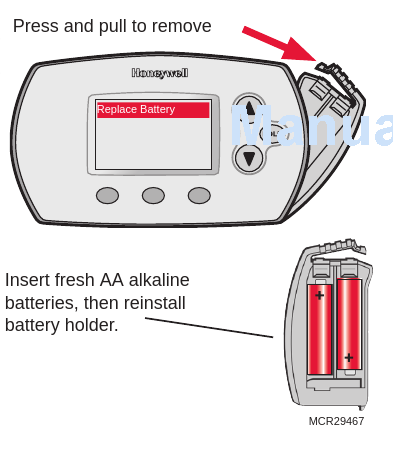
Each of our thermostats contain two AA batteries.
For each of our four thermostats (two in the back shop, one in the studio by the woodshop door, one inside the conference room behind the TV):
- Check each thermostat to see if the REPLACE BATTERY indicator is flashing.
- Open the battery case following the image below and inspect the battery and terminals. If you see corrosion, carefully remove and dispose of the existing batteries, then use 220 grit sandpaper to clean the terminals (if they're corroded)
- The back shop thermostats are covered with a locked protective case. The keys to this case are in the drawer of the black rolling cart next to the front desk. A spare set are located in the keybox on the wall of the Graphics studio; the password is in Vaultwarden on the front desk PC.
- If the "replace battery" indicator is flashing, replace the batteries - there are spares in the class supply room.
- If this is the first time this task is completed this year, replace the batteries regardless of the indicator.
- Ensure the clock is set to the correct time - see honeywell_manual.pdf
- Ensure the battery holder is properly closed and any safety covers are returned and locked.
2 Comments
Approve #1
Approve #5