
Correct thermostat temperatures and modes (HVAC)
See this Asana task for history.
Our AC systems will fight each other if set to different modes - this dramatically increases our power bill and takes away money which could be used to buy consumables and other equipment.
Read this doc in its entirety before changing anything
Ensuring correct temperatures
- Read the rest of this document first for context.
- If "Run Schedule" is visible, press it and mention this on #techs - this indicates that the thermostat was in a manual mode.
- Select "Set Clock/Day/Schedule", then" Set Schedule". Ensure the times and set points for "Wake", "Leave", "Return", and "Sleep are set accordingly:
- Summer (when internal shop temp exceeds 76F)
- "Wake": 7:45AM, 86F
- "Leave": 10AM, 76F for studio/small rooms, 80F for main shop
- "Return": 9:30PM, 86F
- "Sleep": 10PM, 86F
- Winter (when internal shop temp drops below 65F)
- "Wake": 7:45AM, 55F
- "Leave": 10AM, 65F
- "Return": 9:30PM, 55F
- "Sleep": 10PM, 55F
- Summer (when internal shop temp exceeds 76F)
- Ensure that the schedule is set exactly the same for both MonTueWedThuFri and for SatSun (Sat + Sun separately for conference room)
- Ensure that the conference room thermostat is not displaying "HOLD" on the display. If it is, report to #techs and click on "Run Schedule" to set it on the automated schedule.
If the interface is unclear / confusing, see honeywell_manual.pdf around pg 10:
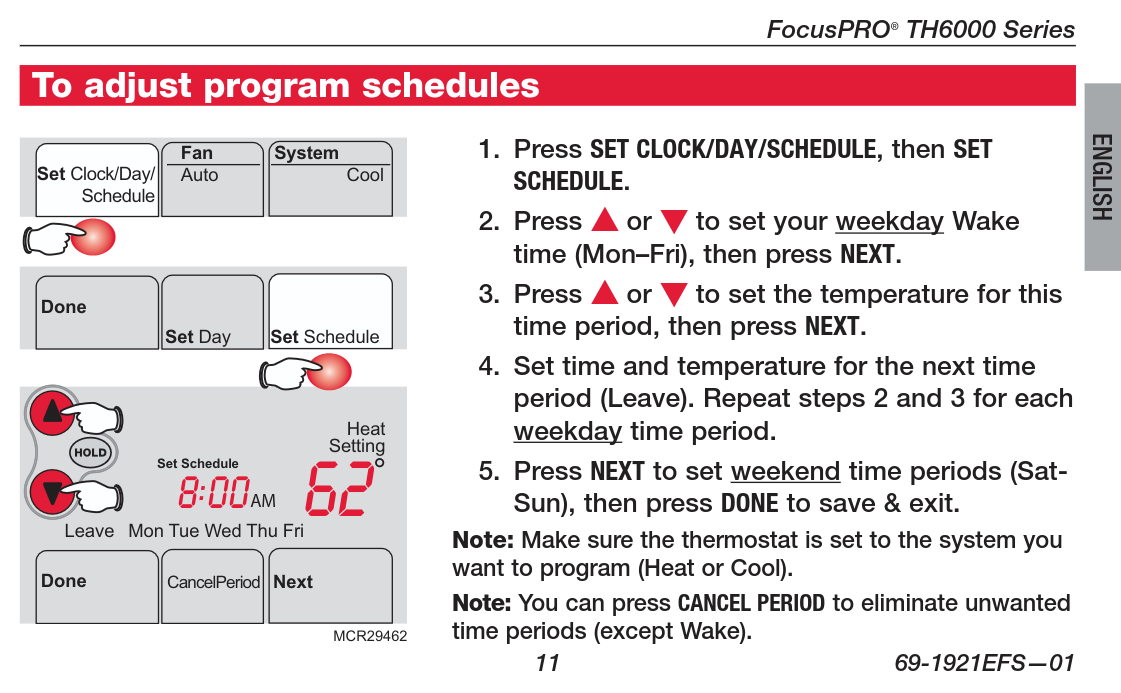
Conference room thermostat
The conference room thermostat is a different model from the rest; these are its quirks:
- Control buttons are hidden; flip the panel down at the bottom to access the buttons.
- Must set all "Wake", "Leave", "Return", "Sleep" options, also Saturday and Sunday are two different programs
- Latest wake permits is 7:45 AM on weekdays; but it's different for weekends and "heat" mode has different timing limitations than "cool" mode. This is why our schedule uses "Away" and "Return" to set the boundaries during shop hours.
Thermostat Locations
Digital thermostats:
- There are two in the back shop - one by powder coat, one by general woodshop on the poles
- One in the studio by the woodshop door
- One in the conference room
- This one is a different model; see "Conference room thermostat" section above.
Heater thermostats:
- One in the forge; controls forge heater
- 2 broken/unused thermostats in back shop - one by wood lathe exit door, other on wall by plastics/class supply room
"Away" temperatures
Adjust set point by 10 degrees outside of business hours (higher on cool mode, lower on heat mode)
Summer
Only set to cool mode when the internal shop temperature exceeds 76F
When the internal shop temperature exceeds 76F:
- All digital thermostats:
- Mode: Cool
- Set point: 76F for studio and small rooms, 80F for main shop
- "Sleep": 86F
- Fan: Auto
- Heater thermostats:
- Forge: 55F
- All others: OFF
Winter
Only set to heat mode when the internal shop temperature drops below 65F (or other cases below)
When the internal shop temperature drops below 65F, OR if >24h of below-freezing outside temperatures forecast, OR if temperatures below 0F forecast overnight:
- All digital thermostats:
- Mode: Heat
- Set point: 65F
- "Sleep": 55F
- Fan: Auto
- Heater thermostats:
- Forge: 55F
- All others: OFF
3 Comments
Approve #6
Approve #14
Approve #16
Summer set points were raised after a $3k energy bill that was mostly just trying to cool the building.