Function Generator Tool Tutorial
Function generators are basically very fast power supplies. They allow you to switch the power from positive to negative very fast at a controlled frequency and control the shape of how it switches. It also can generate pulses with a controlled width.
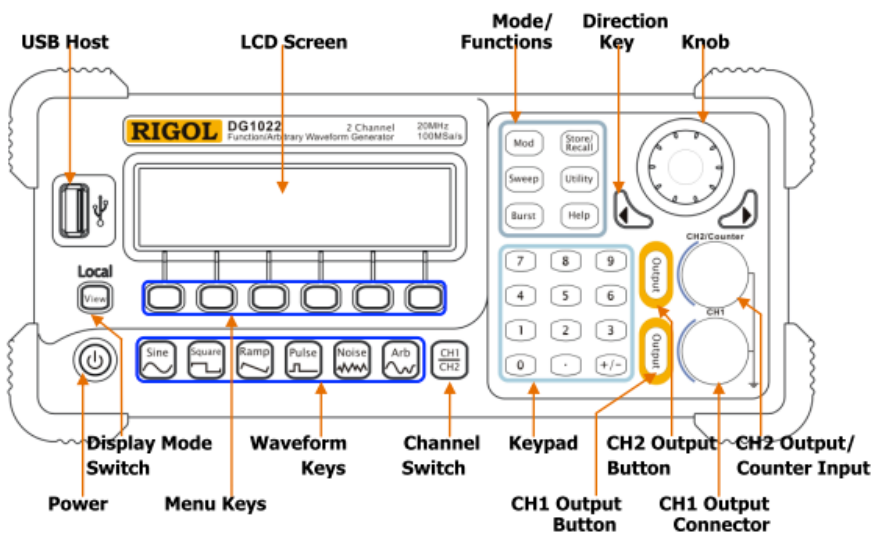
Controls
The main controls for the power supply are:
- Power on/off
- Waveform Keys
- General purpose knob
Amplitude and Frequency Control
Let’s explore the function generator by making it produce sound. To do this we will connect a piezobuzzer to the CH1 output connector but first we will make sure the voltage is low enough so we do not destroy it.
- Turn on the function generator and check that you have selected CH1, if not press the channel select button to select CH1.
- Press the sine wave button .
- Using the knob turn down the voltage to 1V.
- If the CH1 output button is lit, press it to turn it off and then connect your piezobuzzer to CH1.
- Use the menu keys to select frequency and then use the knob to turn the frequency to 100 Hz.
- Press the CH1 output button to turn on the output. Your piezobuzzer should start singing to you very badly.
- Adjust the frequency of the function generator to hear how high pitched and annoying can you make it.
- Adjusting the voltage to make it even loud or quieter, do not go above 3V as you do not want to kill your piezobuzzer buddy.
Waveform Types
There are different types of waveforms other than the sine wave.
- Press the square wave button and hear how the sound changes. The square wave has another option to try - the duty cycle, which determines what percentage of the each cycle is high and what percentage is low.
- Press the ramp button and hear how it sounds. The ramp waveform is also referred to as a sawtooth waveform. A new option on the ramp waveform is the symmetry option which controls how fast the wave rises and falls.
- Press the pulse button. This waveform is similar to the square wave but is designed to be easier to generate more spread out pulses. To try this, change the settings so that your piezobuzzer is clicking once a second.
- Press the noise button, this sends random noise to the output, with controls on the amplitude and bandwidth of the signal.
- The "Arb" button is a more advanced function that allows you to create an arbitrary waveform.
Cleanup
- Always turn down the voltage and turn off the output before turning off the main power.
- Gently wind the probes and wires up so there are no tight bends in the wire that could break the wire over time.
- Clean up the table and floor around where you worked.