# Graphics - Heat Press and Cap Press

Hotronix Maxx Cap Press, Hotronix Swinger Heat Press
Clearance: Required

# Manual(s)

*Manuals and other reference materials from the manufacturer or other sources.*

# Member Notes


# Resources

*Where to obtain materials, consumables, and tooling.*

[Heat Transfer Vinyl Supplier](http://www.siserna.com/heat-transfer-vinyl/&sa=D&source=editors&ust=1676742642336998&usg=AOvVaw1AuKvjLtQOVQwyteR5FmM5 "http://www.siserna.com/heat-transfer-vinyl/&sa=D&source=editors&ust=1676742642336998&usg=AOvVaw1AuKvjLtQOVQwyteR5FmM5")

[Hotronix Swinger Press Tutorial](https://www.youtube.com/watch?v%3DVq2gGIhWeHk&sa=D&source=editors&ust=1676742642337581&usg=AOvVaw2YKoT3eBA0CSczBf3WvUlK "https://www.youtube.com/watch?v%3DVq2gGIhWeHk&sa=D&source=editors&ust=1676742642337581&usg=AOvVaw2YKoT3eBA0CSczBf3WvUlK")

[Tips &amp; Tricks](https://www.youtube.com/watch?v%3DQwDzW-yQARI%26t%3D44s&sa=D&source=editors&ust=1676742642338066&usg=AOvVaw1u8rSpBcnbrmxAobTwqiIh "https://www.youtube.com/watch?v%3DQwDzW-yQARI%26t%3D44s&sa=D&source=editors&ust=1676742642338066&usg=AOvVaw1u8rSpBcnbrmxAobTwqiIh")

[Starting Heat Printing Business](https://www.youtube.com/watch?v%3DUvJqh3KGu1Q&sa=D&source=editors&ust=1676742642338587&usg=AOvVaw3RWfMPngumloV45tHjMZdi "https://www.youtube.com/watch?v%3DUvJqh3KGu1Q&sa=D&source=editors&ust=1676742642338587&usg=AOvVaw3RWfMPngumloV45tHjMZdi")

[Materials &amp; Temperatures](https://www.hamblyscreenprints.com/heat-press-time-temperature-guide-chart/&sa=D&source=editors&ust=1676742642339086&usg=AOvVaw2zPEyLslwRcQC1qnBU--XH "https://www.hamblyscreenprints.com/heat-press-time-temperature-guide-chart/&sa=D&source=editors&ust=1676742642339086&usg=AOvVaw2zPEyLslwRcQC1qnBU--XH")

[Heat Press with different fabrics](https://www.youtube.com/watch?v%3DQkOiffXudZI&sa=D&source=editors&ust=1676742642339567&usg=AOvVaw0KVrmpOjOC10JSQO7tZfDS "https://www.youtube.com/watch?v%3DQkOiffXudZI&sa=D&source=editors&ust=1676742642339567&usg=AOvVaw0KVrmpOjOC10JSQO7tZfDS")

# Tool Tutorial

### Heat Press

<div class="level1" id="bkmrk-model%3A-heat-press-na">- <div class="li">Model: [Heat Press Nation Signature Series](https://www.heatpressnation.com/products/hpn-15x15-signature-series-heat-press-auto-open "https://www.heatpressnation.com/products/hpn-15x15-signature-series-heat-press-auto-open")</div>
- <div class="li">Manufacturer: [Heat Press Nation](https://www.heatpressnation.com/ "https://www.heatpressnation.com/")</div>
- <div class="li">Manual: [Manual](https://drive.google.com/file/d/1xneh9ANBKdTuyuSZxldT_eZgHOCZzcN4/view?usp=sharing "https://drive.google.com/file/d/1xneh9ANBKdTuyuSZxldT_eZgHOCZzcN4/view?usp=sharing")</div>

</div><p class="callout warning">Keep hands clear when locking the pressure  
</p>

<p class="callout warning">Ensure work area is clear before heating</p>

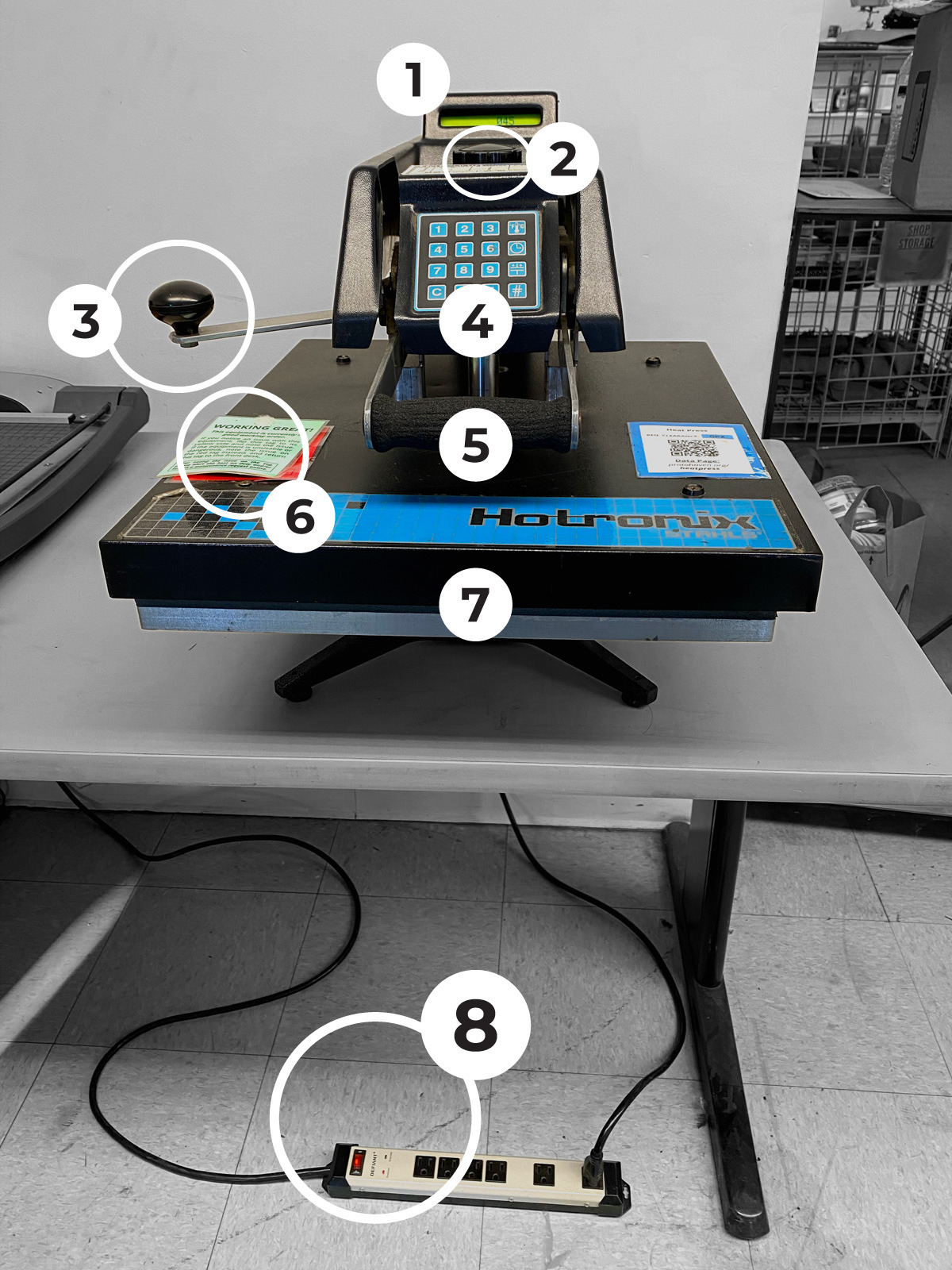
### Tool Anatomy

<div class="section_highlight_wrapper" id="bkmrk-display-pressure-adj"><div class="level2">1. <div class="li">Display</div>
2. <div class="li">Pressure Adjustment</div>
3. <div class="li">Swing Handle</div>
4. <div class="li">Keypad</div>
5. <div class="li">Lift Handle</div>
6. <div class="li">Maintenance Tag</div>
7. <div class="li">Heat Platen</div>
8. <div class="li">Power Switch</div>

</div></div>#### CONTROL PANEL

<div class="section_highlight_wrapper" id="bkmrk-set-temperature-set-"><div class="level3">1. <div class="li">Set Temperature</div>
2. <div class="li">Set Time</div>
3. <div class="li">Set Pressure</div>
4. <div class="li">Enter</div>

</div></div>### Tool Safety

<div class="section_highlight_wrapper" id="bkmrk-to-avoid-burns%2C-do-n"><div class="level2">- <div class="li">To avoid burns, do not touch the heated platen during use.</div>
- <div class="li">Keep hands clear of the upper platen of the press during platen lock down as the pressure may cause injury.</div>
- <div class="li">Work area must be kept clean, tidy and free of obstructions.</div>
- <div class="li">Ensure temperatures are safe to use with material at hand.</div>

</div></div>### Setup

<div class="section_highlight_wrapper" id="bkmrk-connect%C2%A0the-power-ca"><div class="level2">1. <div class="li">Connect the power cable to the power strip</div>
2. <div class="li">Power on the power strip</div>
3. <div class="li">Position substrate between teflon sheets (use kraft paper if dye sublimating)</div>
4. <div class="li">Adjust the pressure and time</div>
5. <div class="li">Set the target temperature</div>
6. <div class="li">Wait for the target temperature to be reached</div>
7. <div class="li">Begin pressing</div>

</div></div>#### Adjust the Pressure  


<p class="callout warning">This part of the tutorial is for an older version of heat press and needs to be remade with the new controller.</p>

[![ASCII���Screenshot](https://protohaven.org/wiki/_media/tools/heat_press_tool_tutorial_image2.jpg "ASCII���Screenshot")](https://protohaven.org/wiki/_detail/tools/heat_press_tool_tutorial_image2.jpg?id=tools%3Aheat_press%3Astart "tools:heat_press_tool_tutorial_image2.jpg")

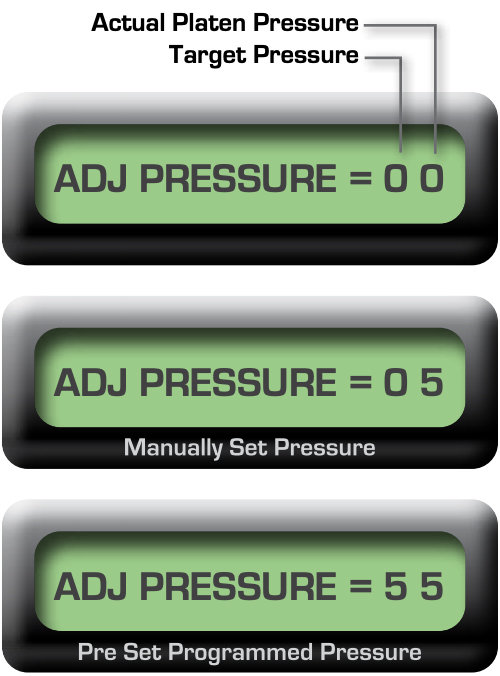
The Actual Platen Pressure displays the manual pressure you are applying (Numbers 1 - 9)

The Target Pressure will always display 0 when manually applying the pressure

1 - 3 = Light Pressure

4 - 7 = Medium Pressure

8 - 9 = Heavy Pressure

<div class="section_highlight_wrapper" id="bkmrk-press-the-pressure-k"><div class="level3">1. <div class="li">Press the Pressure Key for 2 seconds</div>
2. <div class="li">Raise the platen to the up position, disengaged from the printing plate</div>
3. <div class="li">Position material on the press plate</div>
4. <div class="li">Turn the pressure adjustment knob to adjust the pressure</div>

- <div class="li">clockwise to increase the pressure</div>
- <div class="li">counterclockwise to decrease the pressure</div>

1. <div class="li">Lower the platen to print position</div>
2. <div class="li">Repeat until the Actual Platen Pressure displays desired setting</div>

</div></div>#### Set The Temperature

<p class="callout warning">This part of the tutorial is for an older version of heat press and needs to be remade with the new controller.</p>

[![heat_press_tool_tutorial_image4.jpg](https://protohaven.org/wiki/_media/tools/heat_press_tool_tutorial_image4.jpg "heat_press_tool_tutorial_image4.jpg")](https://protohaven.org/wiki/_detail/tools/heat_press_tool_tutorial_image4.jpg?id=tools%3Aheat_press%3Astart "tools:heat_press_tool_tutorial_image4.jpg")

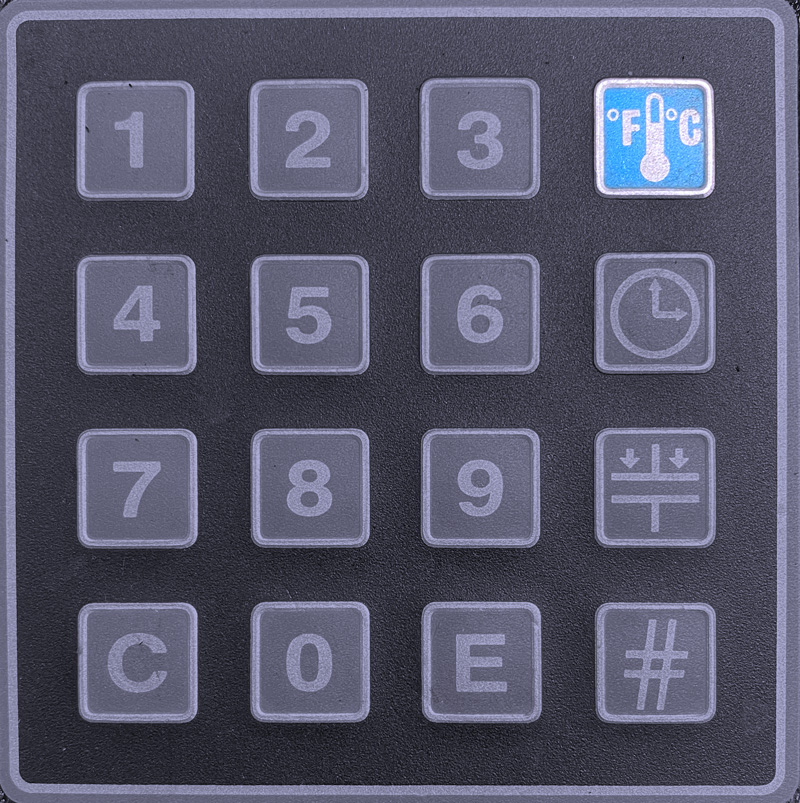
Press the Temperature Key for 2 seconds

Input the desired temperature

Use 3 digits for fahrenheit  
Use 4 digits for centigrade

[![](https://protohaven.org/wiki/_media/tools/heat_press_tool_tutorial_image8.png)](https://protohaven.org/wiki/_detail/tools/heat_press_tool_tutorial_image8.png?id=tools%3Aheat_press%3Astart "tools:heat_press_tool_tutorial_image8.png")
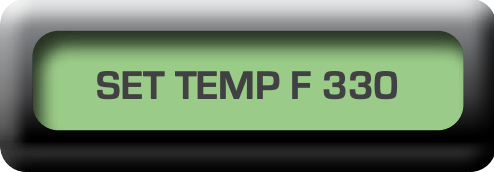
The press accepts temperatures between  
205º - 430º F

[![heat_press_tool_tutorial_image1.jpg](https://protohaven.org/wiki/_media/tools/heat_press_tool_tutorial_image1.jpg "heat_press_tool_tutorial_image1.jpg")](https://protohaven.org/wiki/_detail/tools/heat_press_tool_tutorial_image1.jpg?id=tools%3Aheat_press%3Astart "tools:heat_press_tool_tutorial_image1.jpg")
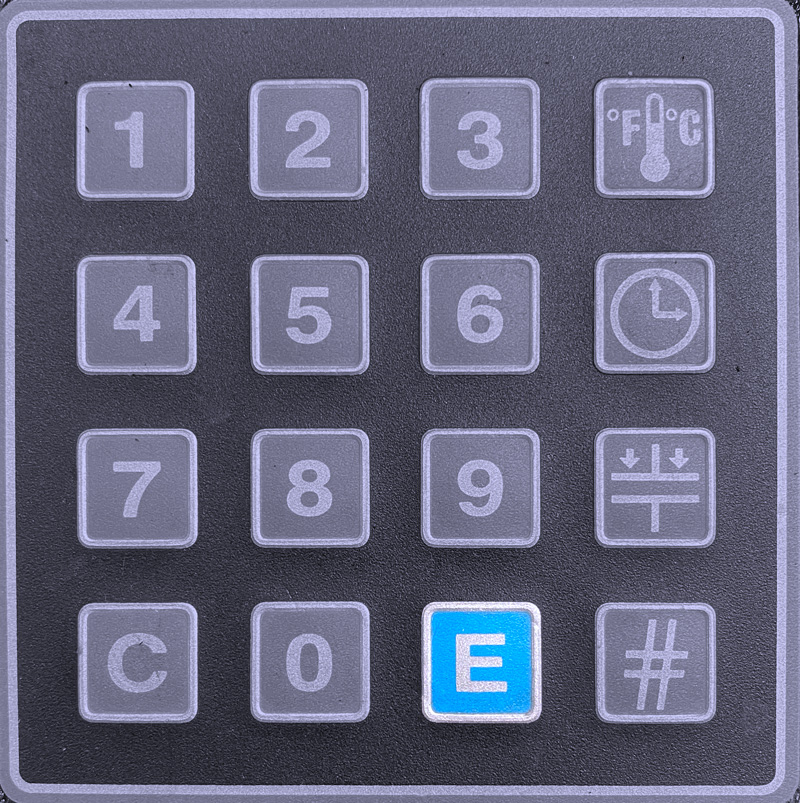
Press Enter to set the temperature

#### Set The Time

<p class="callout warning">This part of the tutorial is for an older version of heat press and needs to be remade with the new controller.</p>

[![heat_press_tool_tutorial_image3.jpg](https://protohaven.org/wiki/_media/tools/heat_press_tool_tutorial_image3.jpg "heat_press_tool_tutorial_image3.jpg")](https://protohaven.org/wiki/_detail/tools/heat_press_tool_tutorial_image3.jpg?id=tools%3Aheat_press%3Astart "tools:heat_press_tool_tutorial_image3.jpg")

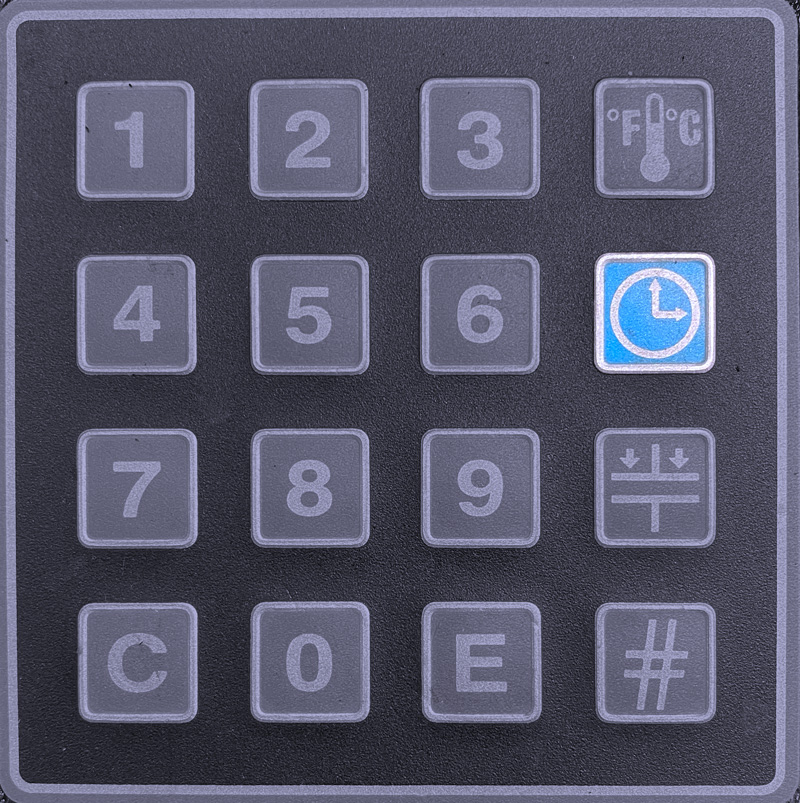
Press the Time Key for 2 seconds

[![](https://protohaven.org/wiki/_media/tools/heat_press_tool_tutorial_image5.png)](https://protohaven.org/wiki/_detail/tools/heat_press_tool_tutorial_image5.png?id=tools%3Aheat_press%3Astart "tools:heat_press_tool_tutorial_image5.png")
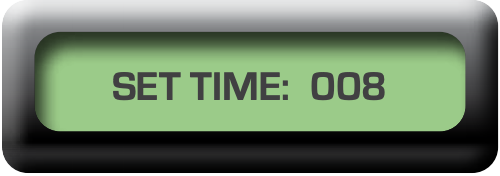
Input the desired range of seconds in 3 digits  
The press accepts inputs of 001-999 seconds

Press Enter to set the time[![heat_press_tool_tutorial_image1.jpg](https://protohaven.org/wiki/_media/tools/heat_press_tool_tutorial_image1.jpg "heat_press_tool_tutorial_image1.jpg")](https://protohaven.org/wiki/_detail/tools/heat_press_tool_tutorial_image1.jpg?id=tools%3Aheat_press%3Astart "tools:heat_press_tool_tutorial_image1.jpg")

Your time is now set!

### Operation

<div class="section_highlight_wrapper" id="bkmrk-preheat%C2%A0press-to-ach"><div class="level2">1. <div class="li">Preheat press to achieve the target temperature</div>
2. <div class="li">Swing platen away from the base</div>
3. <div class="li">Position substrate &amp; your graphic between teflon sheets (use paper if dye sublimating)</div>
4. <div class="li">Swing platen into final position</div>
5. <div class="li">Lower and lock the platen into the press position</div>
6. <div class="li">Wait for countdown to complete</div>
7. <div class="li">Immediately lift up and swing the platen away</div>
8. <div class="li">Remove materials and proceed to application’s instructions</div>
9. <div class="li">Monitor the press until the entire run is complete</div>
10. <div class="li">Cleanup</div>

</div></div>### Cleanup

<div class="section_highlight_wrapper" id="bkmrk-power-off-the-power-"><div class="level2">1. <div class="li">Power off the Power Strip</div>
2. <div class="li">Unplug the Heat Press Power Cable from the Power Strip</div>
3. <div class="li">Lift up the press</div>
4. <div class="li">Monitor the area while platen remains hot</div>
5. <div class="li">Clear the work area, recycling where possible</div>

</div></div>### Scrap Breakdown

There is one blue scrap bin reserved for vinyl waste and several trash bins in the studio. Maintaining these are a shared, communal responsibility.

When you notice the scrap bins are full, it’s time to take it to the dumpster out back. Feel free to enlist a helping hand.

If you notice valuable material while emptying the bins, use your judgement to selectively save a few pieces or take it home for your personal use.

### Troubleshooting

<p class="callout warning">This part of the tutorial is for an older version of heat press and needs to be remade with the new controller.</p>

If a beep is heard at any time during programming, an error has been made.

The press will not accept temperatures below 205° F (096° C) or above 430° F (221.6° C). If you mistakenly attempt to key in a temperature beyond the allowable range, the press will beep to alert you of your error.

The press will not accept times below 001 or above 999 seconds. If you mistakenly attempt to key in a time beyond the allowable range, the press will beep to alert you of your error.

### Special Setups

The Heat Press is a versatile tool in the printing process that allows you to get extremely creative with your work! Combining your use of the Heat Press with other tools is what will help you push the boundaries.

The Heat Press is most commonly used with the Vinyl Cutter and the Dye Sublimation Printer.

Printing registration marks in your artwork will allow you to make highly repeatable, complex cuts at the Vinyl Cutter, Laser Cutter, or CNC Router once your artwork is transferred to the final substrate.