Electronics - Digital Microscope
WKR Model 367 Digital Microscope
Manual(s)
Manuals and other reference materials from the manufacturer or other sources.
Member Notes
Resources
Where to obtain materials, consumables, and tooling.
Software per the guide:
- AMCAP for windows 7/8 systems
- Windows Camera for windows 10 systems
- Smart camera application from http://www.inskam.com/download/camera.zip - stored on wiki at camera.zip
Digital Microscope Tool Tutorial
A digital microscope, like a standard microscope, makes it easier to inspect small objects. This is very useful for precision work in textiles, electronics, jewelry, machining, and elsewhere.
Our digital microscope includes a built-in display and can take pictures and video as you work!
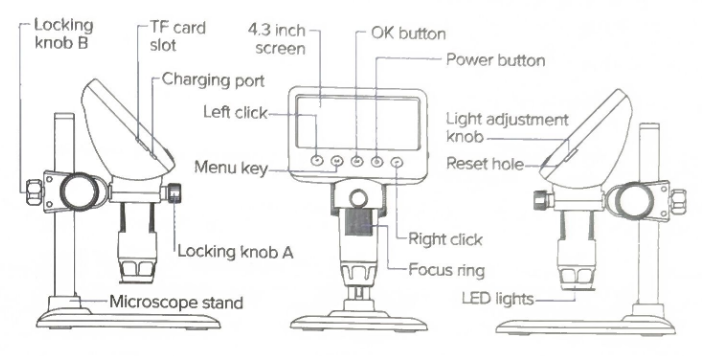
Troubleshooting
| Problem | Solution |
| Device frozen | Press the "reset hole" with a fine needle or pin to force a shutdown |
| Blurry image | Rotate the focus ring until the image clears |
Special Setups
PC Connection
Connect a USB cable between a computer's USB port and the charging port on the microscope to allow direct transfer of data to a PC. For Windows computers, the manufacturer recommends downloading and installing a custom application from this zip file: camera.zip