# Air Tools - Finish Nailer
# Manual(s)
*Manuals and other reference materials from the manufacturer or other sources.*
- Model:[FN250B](https://www.portercable.com/products/power-tools/nailers-and-staplers/finish-and-trim-nailers/16-ga-212-in-finish-nailer-kit/fn250c "https://www.portercable.com/products/power-tools/nailers-and-staplers/finish-and-trim-nailers/16-ga-212-in-finish-nailer-kit/fn250c")
- Manufacturer: [Porter Cable](https://www.portercable.com "https://www.portercable.com")
- Manual: [finish\_nailer-porter\_cable-fn250b.pdf](https://wiki.protohaven.org/attachments/178)
# Member Notes
# Resources
*Where to obtain materials, consumables, and tooling.*
# Tool Tutorial
(Link to PDF Tool Tutorial)
Finishing nail guns are powerful tools that can handle basic home improvement tasks as well as professional jobs. Use finishing nailers (also known as trim nail guns) to complete flooring and molding projects without one swing of a hammer. Finishing nails are thicker (15 or 16 gauge) and have a larger head than brad nails, which are used for light trim projects. While they may be more visible than brad nails, finishing nails are strong enough to secure large and heavy pieces of wood. You can cover them with putty to make them less noticeable. Use finishing nailers to attach heavy crown molding, affix large baseboards or install a new hardwood floor. You can also use them to put together cabinets and furniture.
The [Tool Safety](https://www.protohaven.org/wiki/tools/hand_tools/finish_nailer_16ga?s[]=nailer#tool-safety "tools:hand_tools:finish_nailer_16ga ↵"), [Tool Care](https://www.protohaven.org/wiki/tools/hand_tools/finish_nailer_16ga?s[]=nailer#tool-care "tools:hand_tools:finish_nailer_16ga ↵"), [Operation](https://www.protohaven.org/wiki/tools/hand_tools/finish_nailer_16ga?s[]=nailer#operation "tools:hand_tools:finish_nailer_16ga ↵"), section of this guide are what instructors use to ensure that you can use the equipment according to community expectations.
# Requirements
No Clearance Required. If you don't know how to use the tool ask for help.
# Warnings
🚫 Do not use this nailer for fastening electrical cables. 🚫 Do not fire fastener on top of another fastener, into surfaces too hard to penetrate, or too close to the edge of the workpiece.
🚫 Do not hold tool near body while firing. Tool recoil can cause injury.
⚠️ Wear appropriate PPE.
⚠️ Ensure the switch is in the off position before connecting to power source and/ or battery pack, picking up or carrying the tool.
⚠️ Remove finger from the trigger when not driving nails.
⚠️ Disconnect the tool from the power supply when a. Unattended, b. Performing any maintenance or repair, c. Clearing a jam, d. Moving the tool to a new location.
See the [Safety Section](https://www.protohaven.org/wiki/tools/hand_tools/finish_nailer_16ga?s[]=nailer#tool-safety "tools:hand_tools:finish_nailer_16ga ↵") for more information.
# Tool Anatomy
[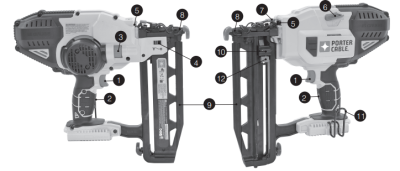](https://www.protohaven.org/wiki/_detail/tools/nailer.png?id=tools%3Ahand_tools%3Afinish_nailer_16ga "tools:nailer.png")
1.
Trigger Switch
2.
Trigger Lock-Off switch
3.
Depth adjustment wheel
4.
Depth adjustment indicator
5.
Worklights/low battery/jam/stall indicator
6.
Stall release lever
7.
Jam clearing latch
8.
Contact trip
9.
Magazine
10.
Pusher latch
11.
Hang hook
12.
Pusher latch release
### Personal Protective Equipment
⚠️ Safety glasses, hearing protection, heavy duty gloves, and closed-toed shoes are required.
⚠️ All hair, clothing and accessories should be secured close to the body.
### Common Hazards
**Unintentional Firing**
-
Be sure the trigger is released before connecting to power.
-
Keep fingers away from trigger when not firing.
-
Always assume the tool contains nails.
-
Do not overreach. Keep proper footing and balance at all times.
-
Do not attach the tool to your body.
-
Use clamps or another practical way to secure and support the workpiece to a stable platform. Holding the work by hand or against the body is unstable and can lead to loss of control.
## Daily Cleaning
Clean magazine, pusher, and contact trip mechanism. This permits smooth operation of magazine, reduces wear, and prevents jams. Clean tool with a clean, damp cloth. Do not oil or lubricate this tool. The use of oils, lubricants or solvents is not recommended as they tend to attract debris.
## Weekly Cleaning
Blow dirt and dust out of all air vents with clean, dry air at least once a week.
## Inspection
Before you start using the nailer you are expected to do an initial inspection and assess its readiness for use.
1.
Remove battery pack from tool and engage trigger lock-off.
2.
Lock the pusher in the back position and remove all nail strips from the magazine.
3.
Check for smooth and proper operation of contact trip and pusher assemblies.
4.
Do not use tool if either assembly is not functioning properly.
5.
NEVER use a tool that has damaged parts.
### Set Up
Secure loose workpieces using a vise or clamps to prevent movement while working.
⚠️Make certain the trigger lock-off button is engaged to prevent switch actuation before removing or installing battery.
**TO INSTALL BATTERY PACK:** Insert battery pack firmly into tool until an audible click is heard. Ensure battery pack is fully seated and fully latched into position.
**TO REMOVE BATTERY PACK:** Depress the battery release button and pull battery pack out of tool.
### Loading
⚠️Keep the tool pointed away from yourself and others.
⚠️Never load nails with the contact trip or trigger activated.
⚠️The battery should always be removed and the trigger lock-off is engaged whenever any adjustments are made or when tool is not in use.
⚠️Keep fingers clear of pusher to prevent injury.
1.
Insert fasteners into the bottom of the magazine.
2.
Pull pusher downward until the nail follower falls behind the nails.
3.
Release the pusher.
1.
Fully depress contact trip against the work surface.
2.
Fully pull trigger and motor will start. (nail will drive into work surface).
3.
Release trigger.
4.
Lift contact trip off work surface.
5.
Repeat steps 1 through 4 for next application.
-
The work lights will flash and then turn off completely to indicate **low battery.**
-
The work lights will flash continually if a nail becomes **jammed** in the nose piece.
1.
To drive a nail deeper, rotate the depth adjustment wheel (3) downwards. This will slide the depth adjustment indicator (4) to the left on the scale.
2.
To drive a nail shallower, rotate the depth adjustment wheel (3) upwards. This will slide the depth adjustment indicator (4) to the right on the scale.
1.
Press pusher latch release button.
2.
Manually slide nails towards the bottom of the magazine.
3.
Open the jam clear door on the nosepiece to verify there are no nails remaining.
-
Update the physical Maintenance Tag at the machine
-
🟢Green can be used without issue
-
🟡Yellow can be used withcaution
-
⛔Red cannot be used without hazard to either the user or the equipment
-
Record issues at [protohaven.org/maintenance](https://protohaven.org/maintenance "https://protohaven.org/maintenance"). This notifies our staff and volunteer maintenance crew of any issues.
### Clearing Jams
-
Remove battery pack from tool and engage trigger lock-off.
-
Rotate the stall release lever (6) on the tool to release the driver blade and clear the jam. If tool is still jammed follow steps 3-11 listed below.
-
Pull pusher downward until it locks in place then tip the tool over so the nails slide freely out from the bottom of the magazine.
-
Lift the jam clearing latch (7) then pull up to open front door (14).
-
Remove bent nail, using pliers if necessary.
-
If driver blade is in the down position, insert screwdriver or other rod into nosepiece and push driver blade back in position.
-
Close the front door and engage the wire form (13) under the two arms (15) on the contact trip. Push jam clearing latch down (7) until it locks in place.
-
Reinsert nails into magazine (see Loading the Tool).
-
Pull pusher (10) downward until the nail follower (D1) falls behind the nails as shown in figure D.
-
Reinsert battery pack.
-
Disengage trigger lock-off (2), allowing the trigger to be actuated.
| Problem | Possible Cause | Possible Solution |
|---|
| Unit will not start. | Battery pack not installed properly. | Check battery pack installation. |
| Battery pack not charged. | Check battery pack charging requirements. |
| Trigger lock-off is engaged. | Disengage trigger lock-off. |
| Tool doesn’t actuate. (Headlights on, motor does not run) | Motor stops running after 2 seconds. | Normal operation; release trigger or contact trip and re-depress. |
| Tool doesn’t actuate. (Headlights flash) | Low battery charge or damaged battery. | Charge or replace battery. |
| Tool doesn’t actuate. (Headlights flash continuously) | Jammed fastener/tool stalled. | Remove the battery, rotate the stall release lever. Clear the jammed fastener, and reinsert battery pack. |
| Jammed mechanism. | See authorized service center. |
| Tool doesn’t actuate.(Headlights on, motor runs) | Jammed fastener/tool stalled. | Remove the battery, rotate the stall release lever. Clear the jammed fastener, and reinsert battery pack. |
| Tool doesn’t actuate. (Headlights on, motor runs, driver blade stuck down) | See authorized service center. |
| Tool operates, but does not drive the fastener fully. | Low battery charge or damaged battery. | Charge or replace battery. |
| Depth adjustment set too shallow. | Rotate depth adjustment wheel to a deeper setting. |
| Tool not firmly applied to workpiece. | Read instruction manual. |
| Material and fastener length too rigorous an application. | Choose appropriate material or fastener length. |
| Tool operates, but no fastener driven. | No fasteners in magazine. | Load fasteners into magazine. |
| Wrong size or angle fasteners. | Use only recommended fasteners. |
| Debris in contact trip or magazine. | Remove debris. |
| Jammed fastener. | Read “Clearing a Jammed Nail”. |
| Jammed fastener. | Wrong size or angle fasteners. | Use only recommended fasteners. |
| Material and fastener length too rigorous an application. | Choose appropriate material or fastener length. |
| Low battery charge or damaged battery. | Charge or replace battery. |
| Debris in nose piece or magazine. | Remove debris. |
| Battery pack will not charge. | Battery pack not inserted into charger. | Insert battery pack into charger until LED lights. |
| Charger not plugged in. | Plug charger into a working outlet. Refer to “Important Charging Notes” for more details. |
| Surrounding air temperature too hot or too cold. | Move charger and battery pack to a surrounding air temperature of above 40 degrees F (4,5°C) or below 105 degrees F (+40,5°C) |
| Unit shuts off abruptly. | Battery pack has reached its maximum thermal limit. | Allow battery pack to cool down. |
| Out of charge. ( To maximize the life of the battery pack it is designed to shutoff abruptly when the charge is depleted.) | Place on charger and allow to charge. |