Shop Closure and Emergency Response
This policy outlines the response to bad weather or other situations which pose a hazard to staff, volunteer, and/or members traveling to and from the shop or being safe inside the shop.
Your Safety Comes First. If at any time you feel unsafe traveling to, from, or being in the shop, do what you need to stay safe.
You must immediately post your decision in the #techs Discord channel (or another highly visible team space).
Do not just tell one person.
Core Principles
- Who Decides to Close? At least one Staff or Board member must be involved for any change to shop hours.
- In an Emergency: If you can’t reach Staff/Board after trying Discord, DMs, and phone calls, use your best judgment to protect everyone’s safety.
- Communication is Critical. All decisions must be posted publicly.
When Should We Consider Closing?
Close or reduce hours if any of these hazards exist:
- Dangerous travel (ice, deep snow, poor visibility).
- Unsafe conditions at the shop (icy walkways, blocked doors/exits, parking lot hazards).
- Expected loss of power, water, or HVAC.
- A breakdown at the shop (power outage, gas leak, flood).
- Sudden lack of shop tech coverage (e.g., due to illness).
- Any other direct threat (e.g., intruder, extreme weather event).
Note: if personal injury is involved in the emergency, it's important to file an injury report when it is safe to do so.
How to Close – Step-by-Step
Delayed Opening / Early Closure (Planned)
- Ask Staff/Board to decide on new hours (e.g., 10am-4pm for evening hazards, or 12pm-6pm for late start).
- A Lead or Staff member must:
- Check the tech calendar for affected shifts.
- Post the decision in #techs, @-mentioning every affected tech by name
- A Staff/Board member becomes the "Incident Commander" ("IC", see below).
If no Staff/Board are available, a Tech Lead or Edu Lead becomes IC.
If no leads are available, the reader of this page (that's you!) becomes IC.
Emergency Closure – Close Immediately
- Delegate these tasks inside the shop if it is safe to do so:
- Person 1: Alert everyone inside to leave. If it is safe to do so:
- Tell members in the shop to shut down and power off all running machines before leaving.
- Give affected members an overnight storage tag so they can stop immediately and clean up later.
- Person 2: Post signs at the front and parking lot entrances.
- Person 3: Watch the front door to inform anyone trying to enter.
- Person 1: Alert everyone inside to leave. If it is safe to do so:
- Notify staff and board; a Staff/Board member becomes the "Incident Commander" ("IC") to manage next steps.
If no Staff/Board are available, a Tech Lead or Edu Lead becomes IC.
If no leads are available, the reader of this page (that's you!) becomes IC.
The Incident Commander’s (IC) Checklist
Your job is to coordinate, not do everything. Delegate tasks to specific people.
As Soon As You Take Charge:
-
Post in #techs and #leadership: “I am acting as Incident Commander. [Link to this wiki page].”
- You are strongly encouraged to post an alternative channel for quickly reaching you - such as a phone number or other chat app - in case Discord has an outage while you are handling the incident.
-
Delegate someone to post in #general (@Members) with closure time, duration, and reason.
The post should encourage members to check the #general channel for the latest news about the shop before coming in. - Delegate someone to post physical signs in the shop if safe to do so (indicate closure of shop or specific areas).
-
Delegate a Staff member to email all members via Neon CRM,
-
Delegate an Edu Lead, Staff, or board member to cancel reservations and classes and directly notify all affected members/students/instructors.
- Delegate someone to ask in #instructors if any instructors have upcoming private instruction, and to cancel if needed.
- Delegate a Staff member to add a blackout time for reservations for the current outage period plus a day (just in case)
-
Identify and announce a backup person as IC in #techs and #leadership in case you can't be reached.
- Notify the rest of the executive committee (Chair, Vice Chair, Treasurer, Secretary) - make sure everyone is on the same page. Do this via the #staff discord channel, and send an email to board@protohaven.org directing board members to the discord channel.
- Create a notes doc and share it so that anyone with the link can edit. Start taking notes on the current state and when things happen. Be thorough.
During the Incident:
- Prioritize immediate safety of staff, volunteers, and members.
-
Communicate clearly, often, and publicly - avoid direct messaging and prefer #techs and #general channels on Discord.
-
Announce when you’ll be unavailable and hand off your role as needed.
-
Plan ahead for when the shop can reopen, and anticipate/announce extended closures and delays.
- If the problem doesn't seem likely to be resolved by 4pm, plan for and announce a late open for the following day.
- Also report the closure to the WTAE Closings System - the account ID and password are stored in Vaultwarden.
After the Incident:
- Reopen the shop - see "Reopening the Shop" section below.
-
Write a brief "postmortem" report, and make sure it is moved to the Postmortems shared drive.
-
Schedule a postmortem review with Leads and Staff.
Specific Weather Guidance
Snow and Ice
- <1” of snow/Light ice: Consider a delayed start to clear and salt walkways, steps, and all emergency exits.
- >1-2” of snow / “Black Ice”: High risk. Likely need delayed opening or closure. Shop Manager must notify the snowplow contractor.
- 6+” forecast: Expect multi-day disruptions and/or closure.
ALL EMERGENCY EXITS MUST REMAIN USABLE IF THE SHOP IS OPEN. The front door, the forge/parking lot door, rear maintenance corner, and rear woodshop corner all open outwards and must not be blocked by snow and/or ice.
Heavy snowstorms - even when expected - have overwhelmed Pittsburgh snowplows and emergency responders for up to a week after the weather has ended.
High winds:
- Winds over 50MPH: anticipate prolonged partial/full power loss (e.g. 1-2 legs of our 3-phase building power can go out).
- When power flickers more than 3 times or is lost for more than 5 minutes, follow "Handling Degraded / Loss of Power" steps below.
High winds have overwhelmed Duquesne Light response times in the past. See this postmortem doc.
Hail & Ice Storms:
- Rarely requires full closure if roads are safe.
- DO warn everyone via Discord so they can protect themselves and their property (e.g., cars).
Heavy Rain & Flooding:
- Sudden burst: Usually no closure needed. Post a warning and monitor.
- Extended heavy rain / flooding forecast: Consider delayed start or early closure. >2” of standing water in the lot is hazardous to vehicles.
Flooding has occurred in our parking lot and on the street in the past (see this Discord message from July 2025). All rain on our roof drains via interior columns into the underground sewer system; when this system overflows, it comes out of the central drain gate in the parking lot and the curbside drain near the entrance to the parking lot.
Extra Actions
Sending Email
Sending email to current members is loud - it reaches over 200 people.
Triple check what you write before you send it, and avoid sending more than 1-2 emails per day.
This requires access to Neon CRM, which is limited to some board members, staff, and some volunteer leads.
Email to members is done via the "Email Campaigns" flow in Neon CRM - it's hidden under the "View More" menu:
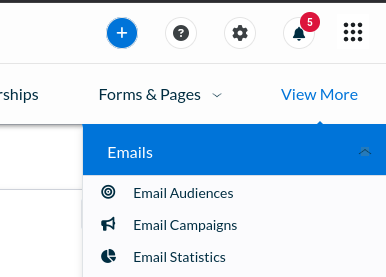
Click the "New Email Campaign" button on the right side of the screen, then fill out the form accordingly. make sure to select "All Current Members" in the audience section.
Once you've saved all fields and clicked "next", configure the campaign to go out immediately and send it off. This will email every active member immediately.
Handling Degraded / Loss of Power
Before addressing the power problem, make sure all members are safe and no tools are in a dangerous state (potentially activating if power returns suddenly).
Protect sensitive electronics:
- Turn off & unplug the air compressor and stop member use of sensitive / gantry equipment (CNC machines, laser cutters etc.)
- Use downed lights coming back on to identify when power is stable
Prioritize our recovery:
- Immediately report the power outage to Duquesne Light so we end up in their queue, and check the outage report to ensure we're still in their system. If that site is not working, call 888-393-7000 to report the outage.
- For every day power hasn't returned, call the business customer support line at 412-393-7300 to reiterate our power status and ask for a time to resolution. Post updates in #leadership and/or #techs channels.
- Duquesne sends text alerts to account holders - currently the person receiving texts for the building is Sam Kusic (@samk8452 on Discord).
In cases of partial power or suspiciously long outage, it may be worth attempting to reset the main breakers to the building. Only do this if you understand how the breakers are set up.
It's also important to turn off sensitive electronics and equipment before resetting the main breakers - this includes the servers in the staff room, routers/switches, and ideally all PCs in the building.
Handling air compressor outage
See Backup (Forge) Air Compressor.
Reopening the Shop
- Walk through the shop and revert any emergency changes made (unplugged equipment, blocked areas, posted signs etc.)
- If power to the building was impacted:
- Check/reset the time on the air compressor and any other equipment with internal clocks.
- Verify that machines with physical power switches (including the wood lathe and Juki sewing machines) are powered off before turning on breakers.
- Use the buddy system when turning breakers on - one person in the affected area, one person at the panel. Call out before throwing switches and confirm everything is good before continuing.
- Check our reservation system and remove any blackout time set that would prevent new equipment reservations
Emergency Shop Access
There is a wall-mounted key box just to the left of the forge/loading bay door. This lock has a 4-digit combination which is stored in Bitwarden and accessible to staff and board members, and contains a key to the door.
If the front door cannot be opened for any reason, tag @Staff and @Board on the #techs channel and ask for the password to the exterior key box.
The combination to the lock must be changed after it's been given out - do this as part of postmortem action items. To reset the lock, open the box, move the "reset" pin left and down, set the code, then put the reset pin back and close the lock. Make sure to update the Bitwarden password!