Policies
Rules for all shop members.
- Tools
- Classes
- Community
- Code of Conduct
- COVID-19 & Other Illness Protocols
- Noise Policy
- Enforcement
- Privacy Policy
- Non-Discrimination & Anti-Harassment Policy
- Anti-Bullying & Harassment Policy
- Drug & Alcohol Policy
- Formal Complaint & Concern Policy
- Member Participation at Board of Directors Meetings
- Youth Policy
- Studio and Shop
Tools
3D Printer Usage Policy
The 3D printers are available for members to use for personal or professional projects, subject to the following rules. This policy is supplemental to and does not override any part of the Protohaven General Damage Policy.
-
Members must follow the safety instructions and guidelines posted near the 3D printers.
-
Members must not use unapproved materials such as abrasive filaments that will rapidly wear out the nozzle. Examples of abrasive filaments include filaments that include carbon fiber, metals, wood, or glow in the dark.
-
Members must clean up after themselves and leave the 3D printers in good condition for the next user.
-
Members are responsible for any damages or losses caused by their misuse or negligence of the 3D printers and must report any issues or malfunctions immediately by filing a tool report using the QR code at the printer or going to https://protohaven.org/tools.
-
Members should reserve the appropriate amount of time on the printer to complete their job. Reservations can be made online at https://reserve.protohaven.org. Members should respect the reservations of other members and not use a printer that is already booked by someone else.
-
If a member has a reservation on a printer and finds a print in progress during their time, they are within their right to cancel the print and remove it from the printer. Members should also notify the shop tech if they cancel a print that is not theirs.
-
Members must ensure that their print has a good foundation by observing the first several layers to reduce the likelihood of failed prints. Members should also check on their prints periodically and make sure they are running smoothly. Failed prints can waste filament, damage the printer, and cause delays for other users. Members should use the appropriate settings and materials for their print and follow the instructions provided by the printer manufacturer or Protohaven staff.
-
Shop Techs or members who observe a failing print should stop the print and report it to the shop tech. They can also try to contact the owner of the print if possible and inform them of the problem.
-
Any damage caused to a 3D printer by a member or a members print job is covered under the Protohaven Damage Policy.
By following this policy, members can ensure a safe and productive 3D printing experience at Protohaven. Protohaven reserves the right to revoke or suspend the 3D printing privileges of any member who violates this policy or causes damage to the printers or other equipment. Protohaven also reserves the right to modify this policy at any time without prior notice. If you have any questions or concerns about this policy, please contact Protohaven staff or email hello@protohaven.org.
Sawstop Activation Policy
The following is the Protohaven procedures and policy to be followed after SawStop safety system (brake) activations. This policy is supplemental to and does not override any part of the Protohaven General Damage Policy.
Removal
A Shop Tech, Instructor, or Staff must remove the blade and activated brake from the machine and replace the brake and blade following the procedures on the page titled What to do if the SawStop Safety System Activates (page 45) in the Operating Manual or watch a video on the subject produced by SawStop. SawStop Service Tip: Recovering an Activated Brake
Separate the activated brake from the blade and retain both. The previously mentioned video shows how to separate the brake from the blade.
Replacement
The member who causes brake activation is required to reimburse Protohaven for the replacement costs of both the brake and blade. ($145.00)
-
Brake: $95
-
Blade: $50
-
Dado Brake: $115
-
Dado Stack: $115
Reimbursement Option
Members at their own expense can send off the brake to SawStop for analysis and attempt to get a replacement brake.
If you are able to get a replacement brake withing 2 weeks of the trigger you can exchange the new brake for the cost paid to Protohaven.
Reimbursement Process
Mail the activated brake cartridge (no blade) to SawStop for analysis and confirmation that skin contact or other qualifying trigger caused the activation. To initiate this process, call SawStop Customer Service 503-582-9934 and request an RMA (Return Material Authorization) number and follow their instructions.
Upon SawStop’s receipt of the completed form and activated brake, they will determine the cause of activation. If skin contact is confirmed, SawStop will mail a new brake cartridge free of charge.
After receiving the new brake cartridge, bring it to the woodshop within two weeks of brake activation and pay only the replacement cost of the blade ($50.00).
If skin contact is not confirmed, or if a new brake cartridge is not brought to the shop within two weeks, reimbursement of the replacement costs of both brake and blade will be required.
Equipment and Property Disposal
Surplus or obsolete equipment/property, which can no longer be utilized by operations at Protohaven or is in excess of need, should be disposed of in an accessible, equitable, and orderly fashion that maximizes remaining value for the organization and/or minimizes waste and cost to Protohaven.
Sale of surplus or obsolete equipment and property will be approved by the Board. Sales should be conducted in a manner that is fair and non-prejudicial to buyers and ensures transactions are both legal and ethical. Protohaven will avoid giving any particular buyer an exclusive opportunity to buy Protohaven equipment without giving others an equal opportunity; however, Protohaven employees and members can be given limited opportunities to buy certain items at fair market value before they are extended to the general public.
if equipment or property Protohaven is selling was donated to the organization within the past three years and is valued at more than $5,000, Protohaven must complete IRS Form 8282. Revenue from sale of surplus or obsolete equipment and property will be held in a reserve fund (savings account) for future equipment purchases or emergency maintenance.
Classes
Registrations and Cancellations
Registrations close for skills & safety classes, workshops, and intensives 24 hours before the session start time. Depending on the class, workshop, or intensive, empty seats may be made available to Shop Techs. Classes, workshops, or intensives with less than two registered participants will be automatically canceled. Exceptions may be made based on the discretion of Protohaven staff.
Individuals who register for a skills & safety class, workshop, or intensive, must cancel no less than 72 hours in order to receive a full refund or be moved to another class, workshop, or intensive with no cancellation fee.
Cancellation Policies and Fees
Single-session class or workshop
-
If canceled 72 hours or more before the scheduled date, the participant will have the option to receive a refund, or have their registration moved to another class or workshop.
-
If canceled within 72 hours of the scheduled date, no refund will be provided, but the participant may choose to have their registration moved to another class or workshop or to receive a credit on their account.
Multi-session class or workshop
-
If canceled 1 week (7 days) prior to the start date, the participant will have the option to receive a refund or account credit minus a $35 cancellation fee, or to have their registration moved to another multi-session class or workshop, if available.
-
If canceled less than 1 week (7 days) prior to the start date, no refund will be provided, but the participant will receive a credit on their account, minus a $75 cancellation fee.
-
If a participant is a no-show, no refunds, credits, or transfers (rescheduling) will be given.
Please be aware that there are NO exceptions to these cancellation policies.
Community
Code of Conduct
Accepted: 4.01.2024, Updated 9.24.2026
These rules and policies are subject to change. Changes will become effective immediately upon successful vote of adoption by the Board of Directors.
Core Values
Protohaven supports a maker space that values:
Inclusion: We strive to create an environment where all feel welcome and are treated with dignity and respect.
Empowerment: We share our knowledge, resources, tools, and space to build the capacity of others.
Collaboration: We foster a shared learning environment that offers various levels of engagement to honor the creative aspirations of everyone.
Community Guidelines
We ask that our members:
Be Respectful: Our students, members, instructors, Shop Techs, and partners bring with them a rich variety of experiences, perspectives, and aspirations. What brings us together is a shared interest in the process of making things. To create a welcoming, supportive environment, we ask each individual to treat one another with care and openness to diversity of race, gender, orientation, age, identity, and ability.
Take Responsibility: Protohaven is built around shared resources – space, tools, knowledge, and the community itself. To preserve these communal assets, each individual is asked to take responsibility for their own actions and to be mindful of how they impact those around them. We are each accountable for ourselves, and don’t expect others to bear the costs of our actions.
Help Out: Protohaven is a public charity and is made possible only by people giving more than they take. In this spirit, we ask each individual to find opportunities to help each other, the organization, and our broader community. We also ask each individual to recognize that assistance is not always sought, to seek consent before providing aid, and to provide opportunity for others’ work and discovery.
Safety Rules
Report all injuries and incidents:
-
Immediately report all accidents, injuries, or incidents to the nearest Protohaven Shop Tech or Instructor.
-
Immediately discontinue use of the tool(s) or equipment if it becomes unsafe, damaged, or is not working properly. Notify the nearest Protohaven Shop Tech.
Safe conduct:
-
Use the space and equipment safely and leave the space and equipment in clean and working condition.
-
Work and behave in a way that protects your own safety and the safety of others.
-
Children under the age of 18 must be accompanied and supervised by an adult at all times.
-
Ask for help when you are uncertain how to use equipment.
Prepare:
-
Safety is your top priority when using the makerspace. If you are not sure what to do, ask.
-
Be aware of locations of emergency exits, first aid, fire, and safety equipment.
-
Never use a tool unless you have been trained to use it safely and have received the appropriate clearance(s).
-
Use a step stool to reach extension cords or tools which are out of reach. Do not climb on tables or chairs to reach for something.
-
Do not work when tired, in a hurry, or under the influence of drugs, alcohol, or other judgment-altering substances.
-
Do not cause a distraction, fool around, or startle anyone while either one of you is using a tool or equipment.
-
Use protective gear and dress right.
-
Do not wear loose-fitting clothing around moving or rotating machinery.
-
Remove ties, jewelry, lanyards, etc., especially around moving or rotating machinery.
-
Tie back long hair.
-
Wear suitable gloves when handling hot objects or sharp-edged items. Do not wear gloves around spinning equipment.
-
Wear goggles where deemed necessary.
-
Wear appropriate ear protection when using or around loud equipment.
-
Obey special machine guidelines when available.
Use tools correctly:
-
Use tools how they are designed to be used.
-
Never use a broken tool. Report any broken tools or machinery to a Protohaven Shop Tech immediately.
-
Do not remove tools from Protohaven premises.
-
Never walk away from a tool that is still on or spinning down.
-
Never tamper with a tool’s safety features. Operate machinery according to recommended procedures and with safety guards in place, as applicable.
-
Do not modify Protohaven tools or equipment unless you have received approval from Protohaven staff or leadership to do so.
Clean up:
-
Clean up after yourself; leave the area clean and tidy.
-
Clean and return all tools to where you got them.
-
Shut off and unplug machines when cleaning.
-
Never use a rag near moving machinery.
-
Use a brush, hook, or a special tool to remove chips, shavings, etc., from the work area. Never use your hands.
-
Keep fingers clear of the point of operation of machines by using special tools or devices, such as push sticks, hooks, pliers, etc.
-
Keep the floor around machinery clean, dry, and free from trip hazards.
-
Clean up spills immediately and put a chair or cone over them if they are wet enough to cause someone to slip.
Non-Discrimination Policy
Protohaven does not promote or discriminate against any person, population group, or organization with regard to categories protected by applicable United States law. These include, but are not limited to race, color, religion, sex, gender identity and expression, physical appearance, language, education background, national origin, age, disability, and veteran status.
Anti-Harassment Policy
Harassment is prohibited and will not be tolerated. Any person who feels they have been the victim of harassment should ask the harasser to cease the behavior if they feel safe doing so. Members or guests asked to stop any harassing behavior are expected to comply immediately. Harassment includes the following, without limitation:
-
Offensive comments related to race, religion, gender, gender identity and expression, sexual orientation, disability, or physical appearance
-
Gratuitous sexual or obscene images or behavior
-
Unwelcome physical contact or sexual attention without consent or after a request to stop
-
Threats or incitement of violence towards any individual, including encouraging a person to engage in self-harm
-
Deliberate intimidation by words, gestures, body language, or menacing behavior
-
Stalking
-
Harassing photography or recording, including logging online activity for harassment purposes
-
Continued one-on-one contact or communication after requests to cease
-
Deliberate “outing” of a sensitive aspect of a person’s identity without their consent
-
Deliberate misgendering. This includes deadnaming or persistently using a pronoun that does not correctly reflect a person's gender identity
Formal Complaints
The Formal Complaint & Concern Policy establishes a clear, consistent, and confidential way for members & volunteers to raise concerns or complaints and sets forth a process by which Protohaven staff and Protohaven’s Board of Directors are to respond. It is intended to ensure that serious matters involving policy violations, member conduct, and safety are swiftly brought to the attention of Staff and the Board of Directors and resolved as soon as possible.
This policy replaces previous forms of reporting with a single, trackable intake channel via the Protohaven Formal Complaint & Concern Form.
It is intended to ensure that serious matters involving policy violations, member conduct, and safety are swiftly brought to the attention of Staff and the Board of Directors and resolved as soon as possible. If you have something that you think is serious, please submit it through this channel to ensure it is received! Your submission will be reviewed promptly, and a Protohaven representative will respond within 72 business hours and follow up on next steps.
Code of Conduct Violations
Any member or guest who violates any part of the Protohaven Code of Conduct will be asked to stop or leave. Violations will be logged in the member’s Neon profile by a Protohaven Shop Tech, Staff, or Board of Director Member. Based on the frequency or severity of the violation(s), Protohaven Board of Directors reserve the right to suspend or terminate the violator’s membership. Notice of suspension or termination will be made in writing. Unsafe use of tools or equipment may also result in removal of clearances, requiring remedial training via classes or private instruction at the violator’s expense.
Members may appeal a suspension or termination of membership in writing to the Board of Directors within 30 calendar days of receipt of notification. Membership will remain in suspension or termination until the appeal is closed.
COVID-19 & Other Illness Protocols
06/12/23 Update
Protohaven follows the health department guidelines regarding masking and does not require masks for fully vaccinated users when community levels are medium or low. You are welcome to continue to wear a mask if you choose.
https://www.cdc.gov/coronavirus/2019-ncov/your-health/covid-by-county.html
Before Coming
Before coming to Protohaven, we ask that members and visitors you:
Pass a self-screen for common symptoms of COVID and other illnesses such as the flu or common cold, including, but not limited to:
-
Fever
-
Cough or shortness of breath
-
Change in sense of taste or smell, and
-
Have not had close contact with someone who has tested positive for COVID in the last 10 days
-
If anyone coming into Protohaven has had symptoms of any illnesses or has been in contact with someone who tested positive for COVID, we ask that they not return to the shop until they either receive a negative COVID test result, or wait 10 days after their last symptoms or contact.
While Here
While using the shop, we ask everyone to:
-
Wear a cloth facemask if not vaccinated
-
Respect other’s comfort levels regarding mask wearing and space
-
Regularly wash their hands
-
Ask for any necessary cleaning supplies to disinfect any areas of use, if necessary.
If you have any questions about these protocols, please contact us at hello@protohaven.org.
After Leaving
If, after leaving the shop, a visitor develops common COVID symptoms, we ask that they get tested for Covid-19 and share the results with us. This allows us to take the appropriate cleaning, testing, and notification measures if the test comes back positive.
6/28/21 Update
Masks requirements at Protohaven significantly reduced, some still in place
Starting today, June 28, 2021, members, students, and guests of Protohaven who are fully vaccinated may choose to remove their masks in the space if they remain more than 6 feet away from anyone who is wearing a mask.
If you are vaccinated: this means you must still bring a mask to Protohaven, but may choose to remove it if you maintain social distance of six feet from anyone wearing a mask. You are also more than welcome to continue to wear a mask if you choose.
If you are not yet fully vaccinated (including children): this means you must continue to wear a mask at Protohaven until further notice.
This policy update was made in light of loosening Pennsylvania Department of Health requirements regarding mask wearing, while recognizing that some members of our community may not be able to receive a vaccine for medical reasons. Others may be fully vaccinated, but may not yet be comfortable being in public without their mask, or in close proximity to others not wearing masks.
We ask each member of our community to mindfully follow these new guidelines out of respect for each other, and in the effort to continue the path to a healthy and more equitable society.
Protohaven’s number one shop rule is Safety, and we treat the COVID-19 pandemic as a serious health concern affecting not only those who use the shop, but those they come in contact with outside of the shop.
We also recognize the important role the shop plays in the work and lives of our students, members, and partners.
In order to allow us to remain open in a limited capacity and to mitigate health risks to a reasonable level, we follow all applicable Federal, State, and Municipal health guidelines and have instituted the following visitor expectations and additional protocols.
Visitor Expectations
Before you come to the shop Before coming to Protohaven, we ask everyone to verify that they:
-
Pass a self-screen for common Covid symptoms, meaning
-
No fever
-
No cough or shortness of breath
-
No change in sense of taste or smell, and
-
Have not had close contact with someone who has tested positive for Covid in the last 10 days
-
Use the online calendar to schedule a time to visit the shop, so we have a record of all visitors
-
If someone has had symptoms or contact, we ask that they not return to the shop until they either receive a negative Covid test result, or wait 10 days after their last symptoms or contact.
While at the shop
While using the shop, we ask everyone to:
-
Wear a cloth facemask, unless they are both fully vaccinated and more that six feet from anyone wearing a mask
-
Regularly wash their hands, and
-
Carry a supplied cleaning kit and wipe down commonly-touched surfaces before and after use
After leaving the shop
If, after leaving the shop, a visitor develops common Covid symptoms, we ask that they get tested for Covid-19 and share the results with us. This allows us to take the appropriate cleaning, testing, and notification measures if the test comes back positive.
Additional Protocols
In addition to the listed visitor expectations, we have also put in place the following protocols:
-
Limit overall building occupancy to 18 people (30% of capacity for the 12,000 sf building)
-
Limit individual area occupancy to 1-5 people (depending on area size)
-
Limit class size to 5 people (4 students and 1 instructor)
-
Provide weekly professional cleaning of the building
In the event of a positive Covid test by a visitor to the space, the space will also temporarily close until:
-
All those present in the space at the same time as the infected person have been notified,
-
All those determined to have been a close contact with the infected person in the space either test negative or begin a 10 day quarantine before returning, and
-
A professional cleaning of the building has been completed
If you have any questions about these protocols, please contact us at hello@protohaven.org.
Noise Policy
Playing or streaming radio/video/podcasts and the like in a manner or volume that is distracting to shop users is a safety risk to members and equipment.
Therefore, playing media in a way that can reasonably be considered distracting is prohibited, unless otherwise permitted by Protohaven.
Violation of this policy may result in a temporary suspension of membership, and repeated violation of this policy may result in permanent revocation of membership and removal from the premises.
Enforcement
Procedure for upholding policies
Board approved 01/2024
This is the procedure we follow for upholding Protohaven Policies to preserve a safe, clean, and equitable space where everyone can make things.
Remediation
When an individual is discovered to be violating a policy while they are still in the shop, one of the board or staff will notify them and offer a path to resolution, e.g:
- if working on a prohibited project, suggest changing the design or removing the project from the premises
- if causing a noise disturbance, offer them some headphones or ask them to turn off the noise
For violations not relating to storage and equipment damage:
- If the issue is not resolved or if it recurs within 3 days, they are asked to leave for the day and the violation is recorded on their account. Penalty steps (as below) are followed as needed.
Refer to the specific sections below for violations relating to storage and equipment damage.
Penalties
In the event that remediation is not successful, penalties will be applied. The member is notified via a standardized email which includes the following:
- A copy of the relevant policy text
- A description of the violation that invoked that policy
- If applicable, a schedule of fees that will occur due to the violation
- If applicable, a duration during which their membership is suspended (see Suspension below)
If fees apply:
- Notify again when the violation is resolved, issuing an invoice and giving them a week to contact with an appeal or payment.
- At the end of the grace period, charge their card unless it's otherwise decided by the board.
- If their card is not on file, their membership is suspended until the fees are paid.
If suspension applies:
- Their membership is immediately suspended, however they are offered the ability to cancel storage subscriptions and remove any storage or materials they have left at the shop while escorted by an on-duty tech.
- At the end of the suspension period, they are notified that the suspension period has ended and their membership can be resumed.
Suspension
- If the member's history includes 3 violations within the past 3 months, their membership is suspended for 30 days.
- Every time the member exceeds this threshold (3 violations in 6 months) the suspension period will increase by 60 days. This means 90 days for the second violation, 150 days for the third violation, etc.
- Actions resulting in sustained damage to the equipment or imminent danger to members may result in a more severe suspension or potentially permanent revocation of membership.
Appeals
- Members have 30 days to appeal decisions resulting in fees or suspension of membership. This is done by a submission in writing.
- 3 board members or staff uninvolved with the initial violation process then meet with the member to hear them out. The membership coordinator should always be in attendance.
- The committee reviews evidence and makes a decision on whether to uphold or change the outcome. They can solicit opinions from the rest of the board if desired.
Special Cases
Storage Violation
When improperly stored objects are found, a report is filed and a "paid storage required" tag posted at the location.
The report includes:
- a picture of the violation
- a description of the violation
- what the violation will be charged as
This report kicks off the following process:
- Automation posts this event to a new #storage channel to notify members.
- If a particular member is suspected, staff will attempt to reach out to the contact info they have on file to notify them of the storage issue directly.
- Daily summaries are posted to #storage of active storage violations and their accrued cost
- If the member reclaims their storage by paying the fee, the violation is closed and a record of the violation is stored in that user's Neon account.
- If nobody claims the violation after ~2 weeks, the objects are declared property of Protohaven and removed from the area.
Note that this process does not incur back fees for storage which was found to already be in violation for a period of time - the fee "timer" starts upon first report.
Equipment Damage
When equipment damage is discovered, a tool report is filed (ideally with a picture).
The report kicks off the following process:
- Automation posts this tool report to #maintenance
- Video log is reviewed if needed, and a suspect is found. Fees and/or suspension are applied to this user per the general flow above.
- A record of the violation is stored in that user's Neon account.
Privacy Policy
Our clients, members, and other parties with whom we do business entrust Protohaven with important information relating to their lives and business. It is our policy that all client and member information is considered confidential and will not be disclosed to external parties or to employees without a âneed to know.â If an employee questions whether certain information is considered confidential, the employee should first check with his or her immediate supervisor.
This policy is intended to alert employees to the need for discretion at all times, and is not intended to inhibit normal business communications.
Non-Discrimination & Anti-Harassment Policy
Purpose and Scope
Protohaven is committed to ensuring an environment that is free from all forms of harassment, discrimination, or conduct that can be considered coercive, or likely to create a hostile environment, including sexual harassment. Discrimination or harassment based on sex (gender), race, color, religion, national origin, age, disability, sexual orientation, gender identity and expression, physical appearance, language, education background, veteran status, or other protected categories is not allowed. Protohaven board members, staff, volunteers, members and guests must be aware that such behavior will not be tolerated.
Responsibility
The Chair of the Board of Directors, acting in concert with the Membership & Operations Coordinator, shall have responsibility for enforcement of this Policy. Protohaven staff will ensure that this policy is presented to new volunteers and that it is reviewed with them periodically.
Policy Statement
-
All Protohaven directors, staff, volunteers, members and guests, regardless of their position, are covered by and expected to comply with this policy. Directors, staff, and volunteers are expected to take appropriate measures to ensure that prohibited conduct does not occur, and members are expected to immediately report any such occurrences of prohibited conduct.
-
Harassment, for purposes of this policy, includes unwelcome sexual advances, requests for sexual favors, and other verbal, visual or physical conduct of a sexual nature. It also includes conduct in any form that is based on sex (gender), race, color, religion, national origin, age, disability, sexual orientation, gender identity and expression, physical appearance, language, education background, veteran status, or other protected categories that has the purpose or effect of unreasonably interfering with Protohaven activities in which an individual participates or creates an intimidating, hostile or offensive environment. The above are not meant to be all-inclusive but are provided as examples of harassment.
-
Staff, volunteers and members who believe they are being harassed, have been harassed, or who witness or hear about harassment directed toward a staff member, volunteers or member should contact the Chair or the Membership & Operations Coordinator.
-
Protohaven takes all complaints seriously. The Chair and the Membership & Operations Coordinator will determine promptly whether to conduct an investigation and, if so, whether to conduct it themselves or to direct outside counsel to conduct an investigation. Investigations will be conducted with all deliberate speed and appropriate discretion. Where required by law, Protohaven will report the complaint to appropriate legal authorities.
-
The findings of the investigation will be furnished to the Board of Directors for appropriate action. Appropriate action, as well as the effective date of the action, for violations of this policy will be based, in whole or in part, on the seriousness of the offense(s) and/or whether the individual(s) involved have previously violated this or other Protohaven policies. Such action may include verbal reprimand, written reprimand, suspension, separation (of employment), or permanent excusal of the member from Protohaven or of the volunteer from their volunteer position(s) with Protohaven. The member or volunteer has the right to appeal to the full Board of Directors within 30 calendar days from the date they are notified of the action. Retaliation for making a complaint about discrimination or harassment or assisting in an investigation of a discrimination or harassment complaint is prohibited.
Approved by the Board of Directors, February 2025
Anti-Bullying & Harassment Policy
Protohaven is committed to providing an environment that is free from harassment and bullying, and where everyone is treated, and treats others, with dignity and respect. Protohaven will not permit or condone bullying or harassment of any kind and applies to staff, volunteers, instructors, members, visitors, and partnering organizations.
Harassment
Harassment is any unwanted physical, verbal or non-verbal conduct that has the purpose or effect of violating a person’s dignity or creating an intimidating, hostile, degrading, humiliating or offensive environment for that person.
It is important to note that harassment occurs even if the harasser perceives his/her behavior as being harmless and without malice, or ‘just a bit of fun’. What matters is how the behavior makes the recipient feel, and not what the perpetrator’s intentions were. Also, a person may be harassed even if they were not the intended ‘target’ of the behavior.
Bullying
Bullying is a sustained form of psychological abuse. It is defined as offensive, intimidating, malicious or insulting behavior, involving the abuse or misuse of power, which has the purpose or effect of belittling, humiliating or threatening the recipient.
This policy covers verbal, nonverbal, physical, coercion, isolation, and intrusion as forms of bullying and harassment.
Drug & Alcohol Policy
Consumption of illegal drugs or other intoxicating substances is strictly prohibited anywhere on Protohaven property (inside and outside).
The consumption of alcohol is only permitted at sanctioned events designated by Protohaven staff.
Members and guests are not permitted to operate equipment or use any tools while under the influence of debilitating medications, illegal drugs, or alcohol.
Smoking & Vaping
Smoking and vaping is not permitted indoors and is not permitted in the front of the building.
Formal Complaint & Concern Policy
Effective: September 2026
1. Purpose
This policy establishes a clear, consistent, and confidential way for members & volunteers to raise concerns or complaints and sets forth a process by which Protohaven staff and Protohaven’s Board of Directors are to respond. It is intended to ensure that serious matters involving policy violations, member conduct, and safety are swiftly brought to the attention of Staff and the Board of Directors and resolved as soon as possible. This policy replaces informal reporting with a single, trackable intake channel.
2. Formal Complaint Definition
A formal complaint is a written, official notification submitted by a Protohaven member alleging a specific breach of our bylaws, code of conduct, standards or policies. Formal complaints are intended to address significant concerns about a person, policy, safety issue or process. This is different from day-to-day feedback or suggestions, which are welcomed through informal conversation or Shop Tech shift reports.
- Examples of matters that should be raised through this channel: conflicts with another member, observations of unsafe actions in the shop, interactions in which you have been made to feel unsafe or disrespected, disagreement with a decision that has directly affected you, or observations of a policy that is not being followed consistently.
- Examples of concerns that should be raised through other, more conventional channels: general facility suggestions, general complaints about administrative processes and shop upkeep, and other one-off matters unrelated to policy and safety. These matters may be raised through ShopTech shift notes, Discord, or brought up in person with staff and Directors.
3. How to Submit a Complaint
All formal complaints are to be submitted via the Formal Complaint & Concern Form (see Section 7). This is the only channel that guarantees a tracked, timely response.
Confidential (not anonymous): Members/volunteers may request that Protohaven staff and directors keep their name confidential.
4. What Happens to Informal Complaints
If a concern meriting a formal complaint is raised in a shift report, Discord, or through informal conversation, staff will:
-
Thank the volunteer for raising it, and
-
Ask them to submit it through the Volunteer Concern Form so it can be formally tracked and addressed.
Protohaven staff and directors will not discuss complaints or share resolutions in Discord or shift reports, even informally. This keeps the process fair, consistent, and confidential for everyone involved, and ensures issues are not being overlooked.
5. Response Timeline
Each submitted complaint shall follow the timeline below, regardless of outcome:
|
Step |
Who |
Timeframe |
|
Complaint submitted via form |
Member/Volunteer |
Any time |
|
Acknowledgment sent |
Staff |
Within 3 business days of submission |
|
Initial review & routing (staff-only vs. board-level) |
Staff + Board Chair |
Within 5 business days of submission |
|
Status update to submitter (even if unresolved) |
Staff |
Within 10 business days of submission |
|
Resolution or documented next steps |
Staff + Board (if escalated) |
Within 30 days, or a revised timeline is communicated |
If a complaint requires longer to resolve (e.g., it involves board action or involvement of external parties), the submitter will be told this explicitly, along with a revised expected timeframe.
6. What Members & Volunteers Are Told vs. What Stays With Staff & Board
Complaint resolution is the responsibility of Protohaven staff and the board of directors. Protohaven staff and directors will make a good-faith effort to be transparent about the status of a complaint investigation and its resolution. However, staff and directors may be bound by confidentiality requirements of other policies. Information sharing will be based on what the organization can share and what it cannot share.
-
General status updates on the complaint process.
-
The outcome as it directly affects the submitter or the program.
-
Any resulting process or policy changes.
-
Advice of legal counsel or other professionals
-
Executive session discussions.
-
Confidential details regarding another individual.
-
Disciplinary actions taken against another person.
If a volunteer's complaint names another individual, that individual will not be told who filed the complaint unless the submitter explicitly agrees to be identified or revealing the identity becomes necessary for a fair, formal process (e.g., a formal HR-style investigation).
7. The Concern Form
A Google Form titled “Protohaven Formal Complaint & Concern Form” is used as the official intake point. It notifies staff and Board Chair immediately upon submission. Your concern will be reviewed promptly. A Protohaven representative will respond within 72 business hours and follow up on next steps.
8. Roles & Responsibilities
-
Designated staff members acknowledge submissions, provide an initial assessment of the complaint, and adjudicate matters within normal operational scope.
-
The board liaison (typically the board chair or their designee) is informed of any complaint involving staff conduct, safety, or any matter escalated by staff. The board designee helps ensure timelines are met if Protohaven staff are unavailable.
-
Board (as a body): reviews escalated complaints, particularly those involving policy changes, repeated issues, or staff members.
9. Reviewing This Policy
This policy will be reviewed and re-approved annually by the Board of Directors, or sooner if deficiencies become apparent. Members/volunteers may suggest changes to this process itself through the same Protohaven Formal Concern Form.
Member Participation at Board of Directors Meetings
1. Member submits, in writing, a request to present an issue to the BOD (board@protohaven.org)
2. Request must be submitted 2 weeks in advance of the meeting (note that meetings are held on the 2nd Tuesday of each month.)
3. Board will review requests and notify member of acceptance - a maximum of 1 issue will be accepted for each meeting and only one member can attend the meeting to present the issue
4. Member will have 15 minutes to present their issue and engage in dialogue with the BOD members
5. BOD members will take the issue under advisement and will report back to the member within 2 weeks of the meeting. BOD will not be obligated to make a decision during the meeting in which the issue is discussed.
Youth Policy
1. Overview
This policy establishes participation of Youth (individuals who are under 18) at Protohaven. The priority is safety, appropriate supervision, and inspiring the next generation of makers.
2. Age Categories & Access Levels
Under 13 years of age
-
May participate in classes, youth programs, or membership with a Participation Waiver signed by parent/guardian.
-
Must be directly supervised by a Parent/Guardian unless attending a school or group organization-supervised session.
-
Front studio access only, no access to back workshop equipment.
-
Parent/guardian membership and supervision is required if youth joins membership (family memberships are available)
Ages 13–17
-
May participate in classes, youth programs, or membership with a Participation Waiver signed by parent/guardian.
-
Must be directly supervised by a Parent/Guardian unless attending a school or group organization-supervised session.
-
Parent/guardian membership and supervision is required if youth joins membership (family memberships are available)
3. Required Documentation
For any youth using Protohaven:
-
A Participation Waiver & Liability Release signed by a Parent/Guardian (physical copy or digital copy at sign-in desk).
-
Emergency contact information.
4. Supervision Requirements
All youth must be supervised by a Parent/Guardian for all classes, workshops, and memberships unless supervised by a school/group organization for the duration of the program.
-
Instructors or staff may restrict access to specific tools at any time based on behavior or safety concerns.
5. Conduct Expectations
Youth must:
-
Follow all Protohaven rules, policies, safety procedures, and instructions.
-
Wear appropriate protective equipment.
-
Not engage in horseplay, distractions, or unsafe conduct.
-
Respect the space, tools, and other Protohaven members.
Failure to follow these rules may result in immediate suspension of access.
6. Tool Use
All tool use requires training and supervision from Parent/Guardian unless supervised by a School/Group Organization. Tool use outside of a class/workshop/program requires tool clearance in addition to supervision.
7. Revocation of Privileges
Protohaven may revoke a youth’s access for:
-
Unsafe behavior
-
Disruption of activities
-
Vandalism or intentional tool misuse
-
Violation of any part of this policy
8. Policy Updates
This policy may be revised as needed. Continued participation indicates acceptance of the current policy. Protohaven may make exceptions to this policy on a case-by-case basis.
Studio and Shop
Tool Clearance Policy
Most tools at Protohaven require clearance before members can use them independently. Clearances demonstrate that members can use equipment properly, safely, and according to Protohaven standards and protocols.
Clearances can be obtained through:
Classes- Our classes are open to the public, and most classes provide clearances on the equipment and tools that are used in the class. The title of the class and the class description will note if a clearance is earned in the class. As a member, you receive 20% off classes, and this discount applies directly when you are logged into your account!
Private Instruction- This option is perfect for members who want one-on-one attention with an expert. Maybe you’ve never used a piece of equipment before, or maybe you have some experience and don’t want to take a whole class. These sessions are offered at $30 per half-hour. You can request Private Instruction here (also linked in Member Dashboard).
If a member uses a tool that they don't have clearance for, a reminder will be issued. If a member continues to use tools without proper clearance, Protohaven will explore membership suspension.
- See what tools you've been cleared on the Member Dashboard (requires member login).
- If you'd like to see what to expect when receiving a particular tool clearance, browse our Clearances book (requires member login).
Tools that do not require clearance:
- Consumer Singer Sewing Machines (in the textiles cabinet)
- Soldering Irons in the Electronics area (the rest of the Electronics bench tools requires clearance)
- Hand tools behind the front desk (drills, electric sanders, nibbler, electric hand shear, reciprocating saw, grinders, circular saw)
Equipment Damage Policy
Overview
At Protohaven we aim to provide a safe and collaborative environment for all members to work on their projects. We encourage responsibility and accountability amongst our members, and we are committed to providing high-quality tools and equipment to help you bring your ideas to life. We trust that all members will show respect for the equipment and for the Protohaven community as a whole.
Sometimes, machines or parts of machines may stop working due to normal wear and tear. If you encounter a problem while using a machine, you are responsible for informing the shop tech on duty and filing a tool report using the QR code on the machine or going to https://protohaven.org/tools right away! This link can also be found in your NeonOne Dashboard.
However, some machines may break down due to improper use. Anyone found responsible for equipment damage will be billed for the cost of repairs. This includes any unintended accidents caused by neglect, misuse, or lack of experience.
Scope
This policy applies to all damage that may occur to the equipment or facilities at Protohaven. The staff members of Protohaven have the authority to assess the extent and cause of the damage and determine the appropriate course of action.
Reporting self-caused damage
Some machines may break down due to improper use. Anyone found responsible for equipment damage will be billed for the cost of repairs. This includes any unintended accidents caused by neglect, misuse, or lack of experience.
If a member causes damage which makes the item unusable, the member must report it immediately by informing the shop tech AND by filing a tool report using the QR code on the machine or going to https://protohaven.org/tools.
Failure to report will incur additional charges. See “How charges are calculated” below.
Restricted use, repeat violation, and policy refusal
-
Any member who causes damage to a machine and it is found that they do not possess the required clearance for the machine will have their membership revoked.
-
Members who repeatedly cause damage to equipment may be temporarily or permanently suspended from accessing Protohaven or specific equipment areas of which they have caused damage, per the discretion of Protohaven staff.
-
Any member who refuses to pay for damages they caused will be held responsible by Protohaven staff. This may result in legal action to recover the full cost of the damage.
The staff will calculate the cost of repairs based on the current market value of the equipment and the availability of parts and labor.
How charges are calculated
The repair cost is a sum of the following:
-
The cost of parts needed to bring the equipment back to proper working order. For example, this could be the cost of a new table saw blade and SawStop cartridge if the brake fires on improper material and destroys a blade owned by Protohaven.
-
The cost of labor to make the repair. This is $30/hour if the damage is reported, or $100 if it is not reported, with a minimum of 1 hour charged. Damage that takes considerable repair time will cost more even if the parts cost is negligible.
Damages caused during a course offered by Protohaven will be assessed by staff on a case by case basis.
Example
In the case of replacing a blade and cartridge on the table saw that was duly reported by the member, the charge would be calculated like so:
-
$50 for a new blade
-
$95 for a new brake cartridge
-
$30 for 1 hour of labor
For a total of $175.
Commonly damaged items
Commonly damaged items include, but not limited to:
-
Wood Shop
-
Table saw blades: $50
-
SawStop cartridge: $95
-
SawStop dado cartridge: $115
-
Dado Blade Stack: $115
-
Damaged table saw fence face: $50
-
Table saw throat plate or ‘insert’ $60
-
Bandsaw blade: $20
-
Resaw bandsaw blade: $50
-
See the Sawstop Specific Policy
-
-
CNC Router
-
Collet: $15
-
Locking nut: $13
-
Spoil board damage greater than ⅛” deep: $45 + $15 sq/ft
-
-
Metal
-
Chop saw blade: $90
-
Shear blade: $600 ($100 to resharpen)
-
Vertical bandsaw blade: $30
-
Horizontal Bandsaw Blade $120
-
Angle grinder damage: $60
-
-
3D Printing
-
Replacement nozzle: $15
-
Damaged Print Sheet: $40
-
Extruder Damage from Detached Print: $70
-
See the 3D Printer Specific Policy
-
-
Rabbit Lasers
-
Laser lens: $40
-
Laser Bed Damage: $295
-
Belt Damage: $100
-
Laser Tube: $700
-
Fire Damage: Repair or replacement price to be assessed
-
-
Textiles
-
Serger upper looper: $25
-
Serger lower looper: $10
-
Upper blade: $15
-
Lower blade: $10
-
Neele plate: $10
-
Feed dog: $10
-
CNC Embroidery Needle:
-
Closing
By joining Protohaven as a member and using the equipment owned by Protohaven, members acknowledge their commitment to respecting the equipment and holding themselves accountable to any damage caused.
Thank you for being a responsible member of our community!
Storage Policy
Updated 2026-05-07
Protohaven provides overnight, weekly and monthly storage options as a convenience for members.
See the Shop Tech on duty to purchase storage.
If you ever need to cancel storage, please see the Shop Tech on duty or reach out to Camden (camden@protohaven.org).
Options
Short term
-
Carts are movable and have a bottom shelf. Use them during the day to assist with projects, or rent them for overnight storage.
-
Tables can be found in the studio and the main aisle of the shop. They're ideal for medium to large glue-ups, drying, or curing.
Long term
-
Parking Spaces are marked floor spaces, ideal for storing large builds or pieces of personal equipment.
-
Board & Bar are ideal for storing longer lengths of wood or metal.
-
Sheet storage is for standard sheet goods up to 4'x8'.
-
Locker storage includes a locking door for tools, small projects, and personal belongings.
-
Cage storage provides secure storage with plenty of room for projects, materials and tools.
-
Rack storage is ideal for horizontal storage of larger materials or tools, up to 4'x8' in size.
If you need storage beyond these options, please reach out to membership@protohaven.org.
Specialty
- Rental Room storage provides an enclosed space for either work OR storage. The room includes 3 outlets (110VAC, 15A) for power.
- Large Project storage provides central shop floor space for undertaking very large projects.
Rules
-
You must purchase storage for any items stored overnight or longer.
-
Stored items must remain within the dimensions of the storage unit (see the Cost table below with listed dimensions). For items stored on table tops and cart tops, the height of stored items cannot exceed four feet.
-
Items stored on the floor (including in the large project space) must be on wheels or a structure movable via our pallet jack.
- Stored items and custom storage solutions must not present a safety risk to members and equipment (structural instability, tip/trip/crush hazard, sharp edges, fire hazards etc.)
-
Maximum 7 nights of short term storage over a 14 day period.
-
Max of 3 carts and 1 table at one time for one member.
-
Do not store living, perishable or other prohibited project item(s).
- Large project storage must receive prior approval from staff and have a set end date.
- Additional rules apply to the rental room:
- Staff must be able to unlock, fully open the door and walk to the middle of the room.
- No modifications to the physical space are permitted (walls, ceiling, floor, outlets, locks, sprinkler, etc.)
- No occupancy is allowed beyond Protohaven business hours (10am-10pm)
- No use of chemicals or other activities requiring ventilation (spray painting, lacquering, staining etc.)
- No additional HVAC equipment (space heaters, air conditioners)
- No persistent power draw totaling over 300 watts (bitcoin mining, ovens, etc.)
If you aren't sure if your storage is in compliance with these rules, ask a Shop Tech to verify.
Violations
When we discover a lapse in following any of the rules above, we will:
-
Attach a physical Storage Violation tag to the item(s) involved
-
Record the violation and owner in our digital system
-
Email the owner of the items (if they are known)
-
Post the violation to #storage on Discord
-
List all relevant details on https://protohaven.org/violations, including pictures and notes.
Violations are tracked for every member. If you violate Protohaven policy 3 or more times within 3 months, your membership will be suspended. Suspensions begin at 30 days, and increase by 60 days for each subsequent suspension.
If you use storage without paying for it, we will issue a violation fee that roughly matches the shortest-term rate for that storage type.
If you do not resolve a violation within 14 days, Protohaven staff/admin will resolve the violation for you by moving, disposing, or utilizing the violating items. If at this time resolving the violation requires paying any fees, your membership will be suspended until you have paid.
We will immediately take action if any items pose an active risk to the health and safety of Protohaven inhabitants. In extreme cases, we may also immediately revoke your membership.
If you receive a storage violation, or if your membership is suspended or revoked as a result of the violations, you may appeal the action to the board of directors. Appeals should be made in writing within 30 days of receiving notice. Appeals are to be submitted to board@protohaven.org.
Cost
AMP members receive a 20% discount on storage. This does not apply to violation fees and overnight storage.
| Storage Type | Rate | Violation Fee | Dimensions (W x D x H) |
|---|---|---|---|
| Cart | $5 overnight | $5/day | 2’ x 4’ x 4’ |
| Table | $10 overnight | $10/day | 3’ x 6’ x 4’ |
| Parking Space | $5 overnight, $30/week, $75/month | $5/day | 2’ x 4’ x 6' |
| Board & Bar | $5 overnight, $15/week, $25/month | $5/day | 1’ x 7’ x 1’ or 1’ x 2’ x 10’ |
| Sheet | $5 overnight, $25/week, $50/month | $5/day | 4’ x 8’ x 1’ |
| Locker | $10 overnight, $25/month | $10/day | 23” x 23” x 26” |
| Cage | $10 overnight, $50/month | $10/day | 35” x “35” x 43” |
| Rack | $10 overnight, $75/month (upper), $150/month (ground) | $10/day | ~96” x 41” x 24” |
| Large Project | $15 overnight, $90/week, $300/month* | $15/day | 8' x 8' |
| Rental Room | $300/month | $15/day | 10' x 8' |
* Storage beyond the bounds of the 8x8 Large Project space requires staff approval and will be charged at an equivalent $/sq.ft.
Terms and Conditions
Members who acquire storage agree to the below terms and conditions and to adhere to all of the policies and practices outlined above.
Storage is a privilege of membership and is only available to current members in good standing. All storage subscriptions must end and stored items must be removed within 30 days of membership cancellation, unless an extension has been granted by Protohaven staff.
Protohaven reserves the right to cancel or revoke a member’s storage privileges at any time. Should a situation occur where Protohaven needs to cancel or revoke storage for any reason, the organization will attempt to contact the member to coordinate retrieval of their belongings. In the event of storage or membership cancellation or revocation, no refund will be provided for any storage fees that have been paid for that time period.
Once a member leaves the premises for the day, any items that are not properly stored will be considered abandoned and may be moved, disposed of, or utilized without notification. This includes items that are stored outside of a storage receptacle and any atypical storage that has not been previously approved by Protohaven staff.
Storage fees are non-transferable and cannot be credited, refunded, or pro-rated.
It is the responsibility of members to keep track of the duration of their storage and when payments are due. Protohaven is not responsible for contacting members to remind them that their storage is near expiration or has expired. Unpaid storage will be charged the violation fees listed above. Refusal to pay late fees will result in suspension of membership.
While Protohaven strives to maintain a safe and secure environment, it cannot guarantee the safety or security of any items stored at Protohaven by its members. Members are solely responsible for their own belongings and assume all risks of damage or loss. Protohaven is not liable for any damage or loss of items stored at Protohaven, whether due to theft, fire, vandalism, natural disaster, or any other cause. By storing items at Protohaven, members agree to release Protohaven from any and all claims arising from damage or loss of such items. Members are encouraged to speak with their insurance provider to discuss any personal policies that might cover their belongings.
Members can choose to share storage, but Protohaven is not able to split storage fees. Members are not permitted to obtain Protohaven storage and subsequently rent it to another member or non-member for a profit.
The rental room is provided solely as a convenience for members in good standing; you will not be considered co-tenant on the lease and so have no rights accorded thereunder.
Protohaven reserves the right to grant exceptions, cancel storage, limit the amount of storage for any member, and to amend these policies at any time.
Prohibited Projects & Activities
Projects involving work on, or are derived from, or are intended to produce, any of the below are prohibited on ProtoHaven premises and at official ProtoHaven events, whether on- or off-site:
-
Firearms, explosives, or accessories thereof (See Firearms Policy)
-
Drug paraphernalia
-
Taxidermy
-
Used liquid propane tanks and compressed gas cylinders
-
Gasoline canisters and tanks
-
Radioactive metals and heavy metals such as lead, mercury, and chromium
-
Hateful, obscene, sexually explicit or harassing objects, items or prints
-
Objects, items or prints that could reasonably be considered inappropriate for the Protohaven community
-
Items prohibited by local, state, or federal law
-
Projects which are harmful/dangerous to others/self or pose an immediate threat to the well-being of others.
-
All other projects and materials not expressly listed here but deemed unacceptable by Protohaven staff
Prohibited Activities
Members must not use the Protohaven equipment computers or space to create or modify objects that are:
-
Prohibited by local, state, or federal law,
-
Unsafe, harmful, dangerous, or pose a perceived or immediate threat to the wellbeing of others
-
Obscene or otherwise inappropriate according to Protohaven’s community guidelines.
-
In violation of another’s intellectual property rights. For example, using devices to replicate someone else’s designs or articles of manufacture may infringe the copyright, patent or trademark protection.
All use of computing resources must be in accordance with Protohaven policies and local, state, and federal laws. These laws and policies cover such areas as illegal access to computer systems, networks, and files, copyright, and harassment issues.
Prohibited Areas
Members and guests are only permitted in Protohaven common areas and are not to enter the supply room, janitorial closet, maintenance room, staff offices, or other areas designated as Staff Only without being accompanied by a staff member, instructor, or Shop Tech.
Firearms
All work on firearms, as defined by the Protohaven in section 1 below, is strictly prohibited unless specifically exempted in section 2.
-
“Firearm” within this policy is deliberately far broader than most legal definitions
-
"Work" or "Working" on a firearm means creating, modifying, or assembling section 1 item(s) together with other section 1 item(s) or section 2 item(s)
Violation of this policy may lead to expulsion from Protohaven and/or filing a criminal complaint with the relevant authorities.
-
Section 1: Work on the following items is explicitly and strictly prohibited:
-
Firearm: a device that expels a projectile or projectiles by means of a deflagrating propellant (i.e. the deflagration or detonation of gunpowder or other similar propellant). This includes not only the BATFE definition of a firearm - its receiver - but also firearm-specific components that attach to a firearm (unless specifically exempted in section 2) including but not limited to barrels, cylinders, magazines, charging handles, safeties, buffers, actions, barrel bushings, linkages, extractors, firing pins, trunions, recoil springs, gas blocks.
-
Replicas: Meant to closely resemble a firearm while lacking the ability to expel a projectile or projectiles
-
Suppressors or Silencers: Reduce the sonic concussion of expelling a projectile or projectiles
-
Reloading: All activities associated with the production of ammunition, including but not limited to processing primers, gunpowder/propellant, cases, and projectiles
-
-
Section 2: Work on the following firearm-related items are exempted, subject to conditions:
-
Devices that expel a projectile or projectiles by non-deflagrating propellant means: Examples include springs, compressed air/gas, electronic, mechanical action. Not exempted are components interchangeable with firearms as defined in the previous section.
-
Slings: Slings and sling attachments opposite point of attachment to the firearm
-
Fasteners and commodity hardware: Standard components used on firearms not specific to firearms
-
Sights: Scopes, sights, lasers, flashlights, etc not integral to the firearm
-
Bipods: And other firearm supports if removable without tools
-
Stocks and grips: May be made, refined, or modified at Protohaven
-
Props: Non-firearm devices that do not closely resemble actual firearms such as sci-fi, fantasy, steampunk creations. Must not include devices from section 1.
-
-
Checking the fit of exempted items (i.e. stock, sling, sights, etc) from section 2 to a firearm in section 1 at Protohaven is prohibited. Section 2 items may be separated from Section 1 items at Protohaven, however they are not to be attached at Protohaven.
Shop Closure and Emergency Response
This policy outlines the response to bad weather or other situations which pose a hazard to staff, volunteer, and/or members traveling to and from the shop or being safe inside the shop.
Your Safety Comes First. If at any time you feel unsafe traveling to, from, or being in the shop, do what you need to stay safe.
You must immediately post your decision in the #techs Discord channel (or another highly visible team space).
Do not just tell one person.
Core Principles
- Who Decides to Close? At least one Staff or Board member must be involved for any change to shop hours.
- In an Emergency: If you can’t reach Staff/Board after trying Discord, DMs, and phone calls, use your best judgment to protect everyone’s safety.
- Communication is Critical. All decisions must be posted publicly.
When Should We Consider Closing?
Close or reduce hours if any of these hazards exist:
- Dangerous travel (ice, deep snow, poor visibility).
- Unsafe conditions at the shop (icy walkways, blocked doors/exits, parking lot hazards).
- Expected loss of power, water, or HVAC.
- A breakdown at the shop (power outage, gas leak, flood).
- Sudden lack of shop tech coverage (e.g., due to illness).
- Any other direct threat (e.g., intruder, extreme weather event).
Note: if personal injury is involved in the emergency, it's important to file an injury report when it is safe to do so.
How to Close – Step-by-Step
Delayed Opening / Early Closure (Planned)
- Ask Staff/Board to decide on new hours (e.g., 10am-4pm for evening hazards, or 12pm-6pm for late start).
- A Lead or Staff member must:
- Check the tech calendar for affected shifts.
- Post the decision in #techs, @-mentioning every affected tech by name
- A Staff/Board member becomes the "Incident Commander" ("IC", see below).
If no Staff/Board are available, a Tech Lead or Edu Lead becomes IC.
If no leads are available, the reader of this page (that's you!) becomes IC.
Emergency Closure – Close Immediately
- Delegate these tasks inside the shop if it is safe to do so:
- Person 1: Alert everyone inside to leave. If it is safe to do so:
- Tell members in the shop to shut down and power off all running machines before leaving.
- Give affected members an overnight storage tag so they can stop immediately and clean up later.
- Person 2: Post signs at the front and parking lot entrances.
- Person 3: Watch the front door to inform anyone trying to enter.
- Person 1: Alert everyone inside to leave. If it is safe to do so:
- Notify staff and board; a Staff/Board member becomes the "Incident Commander" ("IC") to manage next steps.
If no Staff/Board are available, a Tech Lead or Edu Lead becomes IC.
If no leads are available, the reader of this page (that's you!) becomes IC.
The Incident Commander’s (IC) Checklist
Your job is to coordinate, not do everything. Delegate tasks to specific people.
As Soon As You Take Charge:
-
Post in #techs and #leadership: “I am acting as Incident Commander. [Link to this wiki page].”
- You are strongly encouraged to post an alternative channel for quickly reaching you - such as a phone number or other chat app - in case Discord has an outage while you are handling the incident.
-
Delegate someone to post in #general (@Members) with closure time, duration, and reason.
The post should encourage members to check the #general channel for the latest news about the shop before coming in. - Delegate someone to post physical signs in the shop if safe to do so (indicate closure of shop or specific areas).
-
Delegate a Staff member to email all members via Neon CRM,
-
Delegate an Edu Lead, Staff, or board member to cancel reservations and classes and directly notify all affected members/students/instructors.
- Delegate someone to ask in #instructors if any instructors have upcoming private instruction, and to cancel if needed.
- Delegate a Staff member to add a blackout time for reservations for the current outage period plus a day (just in case)
-
Identify and announce a backup person as IC in #techs and #leadership in case you can't be reached.
- Notify the rest of the executive committee (Chair, Vice Chair, Treasurer, Secretary) - make sure everyone is on the same page. Do this via the #staff discord channel, and send an email to board@protohaven.org directing board members to the discord channel.
- Create a notes doc and share it so that anyone with the link can edit. Start taking notes on the current state and when things happen. Be thorough.
During the Incident:
- Prioritize immediate safety of staff, volunteers, and members.
-
Communicate clearly, often, and publicly - avoid direct messaging and prefer #techs and #general channels on Discord.
-
Announce when you’ll be unavailable and hand off your role as needed.
-
Plan ahead for when the shop can reopen, and anticipate/announce extended closures and delays.
- If the problem doesn't seem likely to be resolved by 4pm, plan for and announce a late open for the following day.
- Also report the closure to the WTAE Closings System - the account ID and password are stored in Vaultwarden.
After the Incident:
- Reopen the shop - see "Reopening the Shop" section below.
-
Write a brief "postmortem" report, and make sure it is moved to the Postmortems shared drive.
-
Schedule a postmortem review with Leads and Staff.
Specific Weather Guidance
Snow and Ice
- <1” of snow/Light ice: Consider a delayed start to clear and salt walkways, steps, and all emergency exits.
- >1-2” of snow / “Black Ice”: High risk. Likely need delayed opening or closure. Shop Manager must notify the snowplow contractor.
- 6+” forecast: Expect multi-day disruptions and/or closure.
ALL EMERGENCY EXITS MUST REMAIN USABLE IF THE SHOP IS OPEN. The front door, the forge/parking lot door, rear maintenance corner, and rear woodshop corner all open outwards and must not be blocked by snow and/or ice.
Heavy snowstorms - even when expected - have overwhelmed Pittsburgh snowplows and emergency responders for up to a week after the weather has ended.
High winds:
- Winds over 50MPH: anticipate prolonged partial/full power loss (e.g. 1-2 legs of our 3-phase building power can go out).
- When power flickers more than 3 times or is lost for more than 5 minutes, follow "Handling Degraded / Loss of Power" steps below.
High winds have overwhelmed Duquesne Light response times in the past. See this postmortem doc.
Hail & Ice Storms:
- Rarely requires full closure if roads are safe.
- DO warn everyone via Discord so they can protect themselves and their property (e.g., cars).
Heavy Rain & Flooding:
- Sudden burst: Usually no closure needed. Post a warning and monitor.
- Extended heavy rain / flooding forecast: Consider delayed start or early closure. >2” of standing water in the lot is hazardous to vehicles.
Flooding has occurred in our parking lot and on the street in the past (see this Discord message from July 2025). All rain on our roof drains via interior columns into the underground sewer system; when this system overflows, it comes out of the central drain gate in the parking lot and the curbside drain near the entrance to the parking lot.
Extra Actions
Sending Email
Sending email to current members is loud - it reaches over 200 people.
Triple check what you write before you send it, and avoid sending more than 1-2 emails per day.
This requires access to Neon CRM, which is limited to some board members, staff, and some volunteer leads.
Email to members is done via the "Email Campaigns" flow in Neon CRM - it's hidden under the "View More" menu:
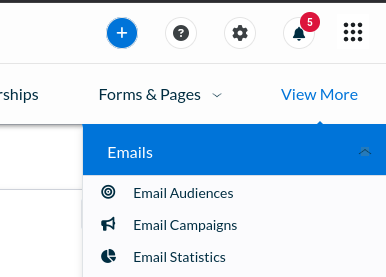
Click the "New Email Campaign" button on the right side of the screen, then fill out the form accordingly. make sure to select "All Current Members" in the audience section.
Once you've saved all fields and clicked "next", configure the campaign to go out immediately and send it off. This will email every active member immediately.
Handling Degraded / Loss of Power
Before addressing the power problem, make sure all members are safe and no tools are in a dangerous state (potentially activating if power returns suddenly).
Protect sensitive electronics:
- Turn off & unplug the air compressor and stop member use of sensitive / gantry equipment (CNC machines, laser cutters etc.)
- Use downed lights coming back on to identify when power is stable
Prioritize our recovery:
- Immediately report the power outage to Duquesne Light so we end up in their queue, and check the outage report to ensure we're still in their system. If that site is not working, call 888-393-7000 to report the outage.
- For every day power hasn't returned, call the business customer support line at 412-393-7300 to reiterate our power status and ask for a time to resolution. Post updates in #leadership and/or #techs channels.
- Duquesne sends text alerts to account holders - currently the person receiving texts for the building is Sam Kusic (@samk8452 on Discord).
In cases of partial power or suspiciously long outage, it may be worth attempting to reset the main breakers to the building. Only do this if you understand how the breakers are set up.
It's also important to turn off sensitive electronics and equipment before resetting the main breakers - this includes the servers in the staff room, routers/switches, and ideally all PCs in the building.
Handling air compressor outage
See Backup (Forge) Air Compressor.
Reopening the Shop
- Walk through the shop and revert any emergency changes made (unplugged equipment, blocked areas, posted signs etc.)
- If power to the building was impacted:
- Check/reset the time on the air compressor and any other equipment with internal clocks.
- Verify that machines with physical power switches (including the wood lathe and Juki sewing machines) are powered off before turning on breakers.
- Use the buddy system when turning breakers on - one person in the affected area, one person at the panel. Call out before throwing switches and confirm everything is good before continuing.
- Check our reservation system and remove any blackout time set that would prevent new equipment reservations
Emergency Shop Access
There is a wall-mounted key box just to the left of the forge/loading bay door. This lock has a 4-digit combination which is stored in Bitwarden and accessible to staff and board members, and contains a key to the door.
If the front door cannot be opened for any reason, tag @Staff and @Board on the #techs channel and ask for the password to the exterior key box.
The combination to the lock must be changed after it's been given out - do this as part of postmortem action items. To reset the lock, open the box, move the "reset" pin left and down, set the code, then put the reset pin back and close the lock. Make sure to update the Bitwarden password!
Spraypaint and VOC Policy
VOCs
From the US EPA website:
Volatile organic compounds (VOCs) are emitted as gases from certain solids or liquids. VOCs include a variety of chemicals, some of which may have short- and long-term adverse health effects. Concentrations of many VOCs are consistently higher indoors (up to ten times higher) than outdoors. VOCs are emitted by a wide array of products numbering in the thousands. Examples include: paints and lacquers, paint strippers, cleaning supplies, pesticides, building materials and furnishings, office equipment such as copiers and printers, correction fluids and carbonless copy paper, graphics and craft materials including glues and adhesives, permanent markers, and photographic solutions.
Spraypaint
Spray paint is a convenient way to apply paint and other surface coatings to projects. However, spray painting exposes everyone in the area to aerosolized solvents and VOCs. These solvents are also flammable and can become a fire hazard when in an area where sparks and/or flames.
Wet paint and coatings
Spray painting is not the only source of hazardous fumes when applying finish coats to materials. Resins, brush-applied paints, eurethanes, and other coatings may all produce fumes which are hazardous to members.
Spraypaint and VOC Policy
- Spray and other painting must be performed exclusively either outdoors or in the forge area. All other areas of the shop are prohibited.
- If spraying in the forge area, flame and spark producing equipment must not be in use. This includes forges, angle grinders, and the belt grinder.
- If spraying in the forge area, the area must be reserved for the duration of the cure time. This will likely be several hours after you've finished spraying, so plan accordingly to avoid classes and other member reservations.
- Spray painting must not exceed ~2sqft of space OR not exceed 30 seconds of active spray time.
- Be respectful and accommodate members in the shop that may have respiratory conditions or other sensitivities to paint and other fumes.
Pet Policy
Hazards to Pets
Protohaven is an active workshop that presents multiple hazards to animals, including:
- Prolonged loud noises that damage sensitive hearing
- Exposure to solvents and other chemicals through ingestion or inhalation
- Sharp, hot, and other harmful debris and particulate matter on the floor which can quickly end up in an animal’s mouth
- Sudden movement by members and materials which can stress or startle animals
Hazards to Members
Animals in the shop present an avoidable hazard to other members, as unpredictable behavior and loud noises presents a distraction from the dangers of using our equipment.
Pet Policy
We require members bringing pets to follow these rules:
- Pets may only be brought to the outdoor areas of Protohaven; bringing your pet indoors is prohibited.
- Pets must be accompanied and leashed at all times; you may not leave your pet unattended outside to work on projects indoors.
- The pet must be cleaned up after, and waste disposed in the dumpster outside.
Note: If you require a service animal, please contact hello@protohaven.org so we can understand your needs and make accommodations.