# Members Handbook

# Who We Are

Founded in 2017, Protohaven is a registered 501(c)(3) organization that engages a diverse community of makers by providing the space, tools, and education necessary to enable our community of learners various stages of creative aspiration. A community makerspace and workshop, and design and fabrication school, Protohaven seeks to create a safe and supportive environment for learning, creating, and community-building.

Protohaven is governed by a board of directors that meets on a monthly basis. The Board supports the organization’s [strategic plan](https://www.protohaven.org/wp-content/uploads/2022/03/Protohaven-2021-2024-Strategic-Plan.pdf). The list of current board members can be found on the Protohaven [website](https://www.protohaven.org/team/).

### About Us

<p class="callout info">For the most up-to-date information about the organization, see [https://protohaven.org/about-us/](https://protohaven.org/about-us/) </p>

#### Mission

Protohaven is a community makerspace, where all can be inspired to learn and create.

#### Vision

To tap into every person’s inner maker to cultivate curiosity, discovery, exploration and growth.

#### Core Values

- Inclusion: We strive to create an environment where all feel welcome and are treated with dignity and respect.
- Empowerment: We share our knowledge, resources, tools, and space to build the capacity of others.
- Collaboration: We are a shared learning community that offers various levels of engagement to honor the creative aspirations of everyone.
- Community: We support each other and the neighborhoods in which we live, play and work

#### Our Commitment to Diversity, Equity, Accessibility, &amp; Inclusion

Protohaven seeks to create an inclusive and equitable organization at all levels. With inclusion as one of our core values, we strive to create an environment where all feel welcomed and are treated with dignity and respect.

# Membership

Membership is a long-term educational and support program for design and fabrication enthusiasts and professionals. Protohaven members receive discounts on public courses, gain independent access to the 12,500 ft2 Wilkinsburg campus for self-guided projects, participate in member-only learning circles, and receive individual guidance based on their specific goals.

The space includes professional-quality tools and equipment in 15 different disciplines ranging from graphic design and laser cutting to woodworking and welding.

Protohaven uses a platform called NeonOne to manage memberships and class/event registrations. When you log into your NeonOne account, your member Dashboard provides access to many important tools and resources related to your member account such as membership status, payment information, class/event offerings and registration history, clearance requests, tool status, and the maintenance/tool report form. Questions related to navigating your NeonOne Dashboard should be directed to the Membership &amp; Operations Coordinator.

Each new member also receives a discount code for a free class when they join for the first time and complete the New Member Orientation. This free class can only be used for a class that the member is enrolling in (cannot be transferred, gifted, or sold to another person). Note: This does not apply to corporate, company, and non-profit memberships.

#### Age Requirements

Minors using the shop outside of scheduled classes must be members and accompanied by a parent or guardian who is also a member.

Front Studio access is limited only to those of 12+ years of age.

Back Workshop access is limited only to those 16+ years of age.

#### Affordability

At Protohaven we are dedicated to being an accessible and equitable makerspace. Low income rates are available for those who require financial assistance to become members through our Access to Making Program (AMP). AMP rates must be recertified on an annual basis. [You can sign up for AMP rates on our website. ](https://www.protohaven.org/amp-membership/)

## Membership Types

<p class="callout info">For the most up-to-date information on memberships, see [https://protohaven.org/membership/](https://protohaven.org/membership/) </p>

<div align="left" dir="ltr" id="bkmrk-weekend-weeknight-ge"><table><colgroup><col width="144"></col><col width="144"></col><col width="144"></col><col width="123"></col></colgroup><tbody><tr><td>  
</td><td>Weekend

</td><td>Weeknight

</td><td>General

</td></tr><tr><td>Pricing

</td><td>$65.00/mo

</td><td>$65.00/mo

</td><td>$115.00/mo

</td></tr><tr><td>Access to Workshop and Studio

</td><td>✅

</td><td>✅

</td><td>✅

</td></tr><tr><td>Class Coupon for New Members

</td><td>✅

</td><td>✅

</td><td>✅

</td></tr><tr><td>Weekend hours  
Sa/Su: 10am - 10pm

</td><td>✅

</td><td>  
</td><td>✅

</td></tr><tr><td>Weeknight hours  
M-F: 5pm - 10pm

</td><td>  
</td><td>✅

</td><td>✅

</td></tr><tr><td>All Hours  
M-S: 10am - 10pm

</td><td>  
</td><td>  
</td><td>✅

</td></tr></tbody></table>

</div>#### General

Access during all of our public hours, Monday – Sunday 10am – 10pm. Our most popular option for enthusiasts who want to be able to use the shop anytime during our public hours. [Sign-up for a General Membership](https://protohaven.app.neoncrm.com/forms/membership).

#### Weekend

Access every Saturday and Sunday 10am – 10pm. An affordable option for those just getting into making, or who need only occasional access and can come in on the weekends. [Sign-up for a Weekend Membership](https://protohaven.app.neoncrm.com/forms/membership).

#### Weeknight

Access Monday-Friday, 5pm – 10pm. [Sign-up for a Weeknight Membership](https://protohaven.app.neoncrm.com/forms/membership).

#### Company

Companies can purchase memberships for their staff at a rate of $92/month per seat for General Membership and $52/month per seat for Weekend Membership. This type of membership requires the company to sign up for a minimum of two seats. Company membership provides access from 10am-10pm, 7 days/week. An EIN is required. Contact the Membership &amp; Operations Coordinator to sign up for this membership type.

#### Non-Profit

Non-profit organizations can purchase memberships for their staff, artists, or other representatives at a rate of $57.50/month per seat. This type of membership requires the organization to sign up for a minimum of two seats. Non-profit membership provides access from 10am-10pm, 7 days/week. An EIN and proof of non-profit status is required. Contact the Membership &amp; Operations Coordinator to sign up for this membership type.

#### Corporate

Corporations can purchase memberships for their staff at a rate of $250/month per seat. This type of membership requires the organization to sign up for a minimum of two seats. Corporate membership provides 24/7 access. An EIN is required. Contact the Membership &amp; Operations Coordinator to sign up for this membership type.

#### Founders

This type of General Membership has been grandfathered in and was available during Protohaven’s early days to recognize individuals for their early support and loyalty. If a Founders membership expires or is paused for any reason, it will be reinstated as at the current, non-discounted General or Weekend Membership rate.

## Storage

Protohaven provides both overnight and monthly storage options to ensure you can continue working on your projects without the hassle of transporting your work to and from home.

<p class="callout info">For full details on how we handle storage, see our [Storage Policy](https://wiki.protohaven.org/books/policies/page/storage-policy "Storage Policy")</p>

#### Receiving Mail and Freight

As a member you can have your mail and supply orders sent directly to Protohaven at no additional cost. Additionally, our loading docks can support freight pick-ups and drop-offs within regular shop hours. We just ask that you are available on your freight delivery day to properly store your shipment before the shop closes that day. Please be sure to check for mail regularly, as mail that has not been picked up for over one month may be returned to the sender. If there are any extenuating circumstances that will prevent you from picking up your mail in a timely manner, please let us know.

## Guest Policy

##### Who

Protohaven members are welcome to bring guests during member hours. We ask that all guests sign in at the front desk. Members are responsible for ensuring that their guests abide by all shop, community and COVID-19 guidelines during their visit. Unless for Protohaven-approved events, guests must be age 12 years or older to be in the studio area of Protohaven, and age 16 years or older to be in the shop area. Youth must be accompanied by an adult at all times.

##### When

Guests are welcome during all member access hours. See the [shop hours](https://docs.google.com/document/d/1SzUFtsD1dCyVa1JLrugpJUo2nP_zd013YzWyoWzXO-w/edit?pli=1#heading=h.vi3avvdttiet) section for details.

##### How

Guests are NOT cleared Protohaven members and should not be assisting or independently operating equipment in any way. Guests may consult, view work in progress and socialize with their host. Guests must join as members, complete orientation, and receive clearances BEFORE working or assisting in the shop.

## Emergency Policy

##### Fire

In the event of a small fire, extinguishers are present throughout the building:

- Kitchen/Hub
- Wood Shop
- Maintenance Room
- Blacksmithing
- Front Entrance

If you use a fire extinguisher for any reason, notify the appropriate Protohaven staff member or on duty tech.

In the event of a true fire emergency OR if the fire suppression system is triggered, evacuate the building immediately and THEN call 911 ONLY after you have safely removed yourself from danger. After emergency services have been contacted notify the appropriate Protohaven staff member or and fill out an incident report.

##### Medical/Injury

For minor injuries there are first aid kits in the kitchen located next to the shop doors, in the forge, and in the woodshop next to the door leading into the studio area. Please report any low supplies to a staff member.

Two AED devices are available and are located in the kitchen next to the shop doors as well as in the woodshop next to the door leading into the studio area.

In the event of a medical emergency time is of the essence. If you can safely and knowledgeably do so, seek consent to stabilize the injured person(s) and CLEARLY IDENTIFY an individual to call 911. If you are unable to stabilize, safely attempt to locate someone who can after calling 911. After the immediate threat has passed and emergency services have been contacted notify the appropriate Protohaven staff member for further instruction.

##### Mental Health/Crisis De Escalation

In the event of a mental health crisis it is important that those affected feel safe and that they have resources at their disposal. Our neighbors at Resolve Crisis Services (333 N. Braddock Ave.) have around the clock support for those in need and we encourage you to direct those in crisis to those resources.

Resolve 24/7 Hotline: 1-888-7-YOU-CAN (796-8226)

Walk-ins welcome without appointment

## Member Events

Members are encouraged to attend member meetings and volunteer days. Dates for events will be announced on email and Discord. Member meetings may be held in-person or virtually. Additional member events may be planned throughout the year. While member meetings are only for active members, volunteer days are open to the general public. Please note that even on volunteer days, only Protohaven members with appropriate clearances are allowed to operate and do maintenance on equipment.

## Other Member Resources

Kitchen/Lounge Area

Our kitchen/lounge area provides a place to meet, relax, and refuel. Members are free to use any of the appliances, and store food and beverage in the refrigerator. Please do not help yourself to any food/beverages/condiments that are not labeled for community use. We also ask that you clean up after yourself and treat the appliances with the same respect that you would your own.

Conference Room

The conference room can be used to hold meetings, do presentations, or make/take phone calls for up to 2 hours. Members must reserve the conference room following the same procedure as equipment reservations.

Studio Computers

The computers in the studio area feature software used for design and fabrication. Protohaven is not responsible for any damage to, loss, or theft of users’ personal property including electronic files left on Protohaven computers.

Computer Lab

When not in use for classes or other programming, members are welcome to use the computer lab.

Lost &amp; Found

Please ask a Shop Tech if you have lost something and need access to the lost and found.

Every Tuesday items will be moved from the “lost and found”, to the “last chance” bin, and the following Tuesday items left will be moved to the “free” bin.

# Get Started


# Sourcing Materials

We're starting a community contributed list of places and vendors. Login with your Neon account and add any vendors that you like to use.

<p class="callout warning">This page is now in read-only mode - materials sources are being collected and organized in the [Material and Services](https://wiki.protohaven.org/books/materials-and-services "Material Sources") book, which any member can edit.</p>

## Woodworking

### Tools

- [Woodcraft](https://www.woodcraft.com/) - Cannonsburg Store: (724) 916-4403
- [Rockler](https://www.rockler.com/) - Robinson Store: (412) 364-7751

### Wood and Lumber Suppliers

- [Keim Limber](https://www.keimlumber.com/)
- [Ocooch Hardwoods](https://ocoochhardwoods.com/)
- [Allegheny Plywood](https://www.alleghenyplywood.com/) Local distributor for businesses making bulk purchases: (800) 747 1058
- [Mars Lumber](http://www.marslumber.com/)
- [Forest 2 Home](https://www.forest2home.com/) Great place for domestic hardwood (they also have a huge selection of cutoffs)

## Metals

### Tools

### Suppliers

- [Fieldcrest Steel Corp](https://www.facebook.com/FieldcrestSteel/), Carnegie PA. (Sells steel shapes by the pound, cash.)

## Plastics

- [Laird Plastics](https://lairdplastics.com/pittsburgh/) (Gibsonia)
- [Piedmont Plastics](https://www.piedmontplastics.com/locations/pittsburgh/) (Cranberry, PA)
- [Total Plastics](https://www.totalplastics.com/contact-pittsburgh/) (Manchester/Pgh, PA)
- [Smokey Hill Designs](https://smokeyhilldesigns.com/collections/materials/products/patternply%C2%AE-acrylic-transparent-galaxy) Printed / Patterned Acrylic

### 3D Printing

- [Polymaker](https://us.polymaker.com/) - Search around for a 15% off coupon before ordering
- [MatterHackers](https://www.matterhackers.com/) - Printers, Filament, CNC, Lasers, and more.
- [Prusa Research](https://prusa3d.com)
- [Keene Village Plastics](https://www.villageplastics.com/) - Euclid Ohio

## Paint and Finishes

## Abrasives

- [Supergrit](https://www.supergrit.com/), Gettysburg PA
- [Brown's Hill Sand](https://brownshillsand.com/), Homestead PA 15120 (412) 854-7263 (Sandblasting media CHEAP)

## Tools

### PPE

# Shop rules and community guidelines

<p class="callout info">For a full list of rules and policies, see the [Policies book.](https://wiki.protohaven.org/books/policies)</p>

### Community Guidelines

##### 1. Be Respectful

Our students, members, and partners bring with them a rich variety of experiences, perspectives, and aspirations. What brings us together is a shared interest in the process of making things. To create a welcoming, supportive environment, we ask each individual to treat one another with care and openness to diversity of race, gender, orientation, age, identity, and ability.

Actions that bully, degrade, or threaten any individual or group are not welcome in our community.

##### 2. Be Mindful

As a member of the space, please be considerate of others that also make use of the space. While there is no time limit for using any of the tools or non-rentable furnishings, we ask that you be mindful of the potential needs of others. This also includes cleaning up after yourself.

##### 3. Take Responsibility

Protohaven is built around shared resources - space, tools, knowledge, and the community itself. To preserve these communal assets, each individual is asked to take responsibility for their own actions and to be mindful of how they impact those around them. We are each accountable for ourselves, and don’t expect others to bear the costs of our actions.

##### 4. Help Out

Protohaven is a public charity and is made possible only by people giving more than they take. In this spirit, we ask each individual to find opportunities to help each other, the organization, and our broader community. We also ask each individual to recognize that assistance is not always sought, to seek consent before providing aid, and to provide opportunity for others’ work and discovery.

### Shop Rules

##### 1. Sign In

Anyone who comes into Protohaven for any reason must enter through the front door, &amp; sign in at the front desk, whether they are a member or not. This includes members, guests, visitors, and volunteers.

##### 2. Members Only

Check Your Membership Status: Except as part of scheduled classes/workshops, only active members and those who have day passes are allowed to use any equipment or tools at Protohaven, this includes any tools or equipment that do not belong to Protohaven. If a member has an assistant with them, that assistant must also be an active member with appropriate clearances in order to use any tools or equipment, or physically assist with work on projects in any way.

##### 3. Be Safe 

Get Clearances: Most tools in the shop require an Equipment Clearance before use. Do not use equipment before obtaining the necessary clearance. These clearances are the bare minimum required to use the equipment and are not a substitute for consulting manufacturers’ safety guidelines, asking for help, or following general safety principles.

Wear Protective Equipment: Closed-toed shoes and safety glasses are required and hearing protection is recommended in the Workshop area of the space. Wear a respirator when sanding or spraying. Use dust collection, fume extractors, and ventilation fans where provided. No gloves, loose clothing, or dangling hair or jewelry around tools that spin. Additional PPE (Personal Protective Equipment) may be required for specific areas and tools.

Watch and Reset Equipment: Never leave a piece of machinery operating unattended. If you’ve changed equipment settings or setup during use, return them to their original states before leaving the tool.

Drugs &amp; Alcohol: Never consume any mind-altering substances before or during using any tools at Protohaven.

##### 4. Take Care of the Tools and Equipment

Get Clearances: Each tool and piece of equipment is different and most are expensive and/or delicate. Clearances provide machine-specific care details so you can effectively use a tool or piece of equipment without damaging it.

Do Not Alter or Use Beyond Limits: Tools at the shop are set up to serve a large number of people and projects. Do not permanently alter them for a particular use. If you temporarily change settings or setup, return them to their original state before leaving the tool. Only use tools within their specified parameters. Anyone altering or using tools beyond their limits will be held responsible for any damages and risks having their membership revoked.

Notify When Maintenance Is Needed: We can only fix what we know about. Please use the status tag at each machine and online reporting system to indicate when repair is needed.

##### 5. Keep the Shop Clean 

Clean Up After Yourself: Making things creates garbage and debris. You are responsible to clean it up. Your work area should look better when you leave than when you started.

Return Tools to Their Original Locations: Large equipment should not be moved for use. Smaller tools or carts should be returned to their original location when you are finished.

Pay for storage: Unless you have paid storage (of which there are many options), everything you bring in with you must leave when you leave for the day. If you pay for storage, you may only store items in the area designated for you. Anything left outside of your paid storage may be removed and disposed of. Please see Protohaven’s Storage Policy for additional information.

### COVID &amp; Other Illness Protocols

Protohaven follows the health department guidelines regarding masking and does not require masks for fully vaccinated users when community levels are medium or low. You are welcome to continue to wear a mask if you choose.

[https://www.cdc.gov/coronavirus/2019-ncov/your-health/covid-by-county.html](https://www.cdc.gov/coronavirus/2019-ncov/your-health/covid-by-county.html)

##### Before Coming

Before coming to Protohaven, we ask that members and visitors you:

1. Pass a self-screen for common symptoms of COVID and other illnesses such as the flu or common cold, including, but not limited to:
- Fever
- Cough or shortness of breath
- Change in sense of taste or smell, and


2. Have not had close contact with someone who has tested positive for COVID in the last 10 days

If anyone coming into Protohaven has had symptoms of any illnesses or has been in contact with someone who tested positive for COVID, we ask that they not return to the shop until they either receive a negative COVID test result, or wait 10 days after their last symptoms or contact.

##### While Here

While using the shop, we ask everyone to:

- Respect other’s comfort levels regarding mask wearing and space
- Regularly wash their hands
- Ask for any necessary cleaning supplies to disinfect any areas of use, if necessary.

If you have any questions about these protocols, please contact us at <hello@protohaven.org>.

##### After Leaving

If, after leaving the shop, a visitor develops common COVID symptoms, we ask that they get tested for Covid-19 and share the results with us. This allows us to take the appropriate cleaning, testing, and notification measures if the test comes back positive.

# Equipment and Getting Access

## Equipment List 

You can see the full list of equipment/tools that Protohaven has to offer, along with their status [HERE](https://www.protohaven.org/equipment). This link is also available in your NeonOne Dashboard.

## Getting Cleared on Tools

Most tools in the shop require clearance before independent use as a member. Each tool is different and most are expensive and/or delicate. You can find our full list of equipment and the clearance associated with each tool at [protohaven.org/equipment](https://www.protohaven.org/equipment/).

Each new member receives a free class coupon (up to $75) when they join and complete the [New Member Orientation](https://www.protohaven.org/product/member-orientation/). Note: This does not apply to corporate, company, and non-profit memberships.

There are two pathways to get cleared to use equipment as a member:

1. **[Take a Class](https://www.protohaven.org/classes/) — Learn through making things together!**

We think the best way to gain clearance on a piece of equipment that is new to you is through a hands-on, supportive class that includes a clearance. They’re also a great way to advance skills that you may already have. Our classes are open to the public.

1. Open to the public, no experience required (unless otherwise stated).
2. 3-6 students maximum, depending on the class.

2. **[Request Private Instruction](https://form.asana.com/?k=YXgO7epJe3brNGLS6sOw7A&d=1199692158232291) — Study [shop protocols](https://www.protohaven.org/tool-trainers/) &amp; show us your skills!**  
      
    If you have previous experience on a tool and/or just want to get to your project, our Clearances are designed for you. These are exclusive to members and are scheduled by request. You’ll need to demonstrate to your instructor that you can use the equipment safely, carefully, and cleanly to receive clearance.

## Materials &amp; Consumables

It is the responsibility of the maker to provide their own materials and consumables in the workshop this includes the materials you are using to construct your work, but also certain consumables that are required for equipment to function (ie. sandpaper, welding nozzles, flux, contact paper, etc.) Our store has some of these items in stock, but we cannot guarantee that everything you need will be in stock at all times. Please come prepared. In order to purchase any items, including snacks and beverages, please see the Shop Tech on duty. We do our best to keep this area stocked, but ultimately it is up to members to provide the consumables that they need for their projects. We cannot accept cash or checks for any purchases.

## Tool Guides

[Tool Guides](https://wiki.protohaven.org/books/tool-guides) are public guides to the basic safe, careful, and clean use of the equipment at Protohaven. They’re the basis for receiving clearance on equipment, and are also useful resources for ongoing use.

Please note that not all Tool Tutorials are available at this time. We will continue to add to the list once additional tutorials are completed.

## Reserving Equipment

Members are recommended to reserve time slots for equipment and areas. This can be done online using their Protohaven account. Reservations are for one and two hour blocks and can be reserved multiple times. You must be cleared in an area or piece of equipment in order to reserve it. Most areas can support 2 members simultaneously working, however others (like welding and the CNCs) can only support 1 user at a time.

Reservations can be made at [https://reserve.protohaven.org](https://reserve.protohaven.org/Web/) or by using the Equipment Reservations link in your Member Dashboard.

Please only reserve the time that you need and be sure to cancel the reservation if it is no longer needed.

If you are using a tool without a reservation, and someone comes in with a reservation to use the tool, we ask you to kindly hop off and allow the other member to use the reserved equipment.

## Maintenance

If any tools or equipment need maintenance, submit a [Tool Report ](https://airtable.com/appbIlORlmbIxNU1L/pagv0lR39A4ALn4zd/form)(also accessible in your Member Dashboard) or report it to the Shop Tech on duty immediately and DO NOT attempt to fix it on your own without permission from Protohaven staff or a Shop Tech Lead with a clearly documented course of action in place.

Members are not permitted to:

- Change planer blades
- Change jointer blades
- Install software
- Modify any machine permanently

Members that are not part of the maintenance crew are not permitted to:

- Change 3D printer nozzles
- Change vinyl cutter blades
- Change dye sublimation ink
- Change laser chiller water
- Surface spoilboard
- Change sanding pads or grinder wheels
- Replace sandblaster media
- Replace sandblaster viewport shield

When performing any maintenance, it is expected that common sense is at the forefront of all actions. This means not performing any actions that will negatively impact or permanently alter the tool/equipment that you are working on.

In the event that you perform any maintenance that results in additional damage to a tool or piece of equipment, you will be responsible for replacing the piece/part that was damaged. Depending on the severity of the damage, you may be held responsible for replacing the entire tool/piece of equipment.

Protohaven’s Shop Techs and Shop Tech Leads are tasked with equipment maintenance. A subset of members then perform maintenance.

Anyone can see the present state of equipment by [checking its status](https://www.protohaven.org/equipment/).

Maintenance is prioritized based on equipment usage.

#### Requests

Maintenance requests inform staff and techs of issues with equipment ranging from simple replacement parts to potential safety issues. Members are encouraged to use this system so that the Protohaven team can respond quickly to shop needs, reducing equipment downtime and keeping you working effectively longer. Maintenance Requests can be found [HERE.](https://airtable.com/appbIlORlmbIxNU1L/pagv0lR39A4ALn4zd/form) This link is also available in your NeonOne Dashboard.

#### Actions

Maintenance actions can only be made by authorized maintenance crew which includes staff, techs, instructors, fellows, and authorized members. Members can view and follow maintenance actions in real time by joining the #maintenance channel in Discord.

#### Equipment Status

You can also view the current status of all equipment and areas by reviewing our Master Equipment List. This list catalogs all equipment and reports its most recent condition and last action taken on it. [View it here.](https://www.protohaven.org/equipment/) This link is also available in your Member Dashboard.

## Equipment Damage &amp; Misuse Policy

This policy can be viewed here. [https://wiki.protohaven.org/books/policies/page/equipment-damage-policy](https://wiki.protohaven.org/books/policies/page/equipment-damage-policy)

Should a member use a piece of equipment in a way that is dangerous or causes damage, the member will be sent the user guide for that piece of equipment, outlining the behavior that needs to be corrected along with what actions were taken that went against the policy. The member will be invited to retake a class that covers that piece of equipment, at their own expense, if they feel they are not comfortable on the machines.

## Addition or Removal of Protohaven Property

Protohaven property is not to be removed from the premises, or disposed of without express permission from Protohaven staff. Additionally, unless approved by Protohaven staff, no items (equipment, tools, supplies, etc) should be added to Protohaven’s inventory. If approved, in order to be reimbursed for any expenses, a receipt must be provided.

# Classes & Workshops

## Classes

Classes are the entry point to our community. They focus on teaching design, fabrication, and related skills.

Class development and support are led by Protohaven staff and volunteers and taught by either contract instructors, Teaching Fellows, or community partners.

## Class &amp; Workshop Levels &amp; Types

#### Skills &amp; Safety Classes

Skills &amp; safety classes are intended to provide hands-on safe operation and instruction regarding basic maintenance of specific pieces of equipment. These classes are not project-based. Upon successful completion of a skills class, students will receive clearance on the equipment covered in the class. Non-member participants receive a free day pass at the end of a skills &amp; safety class. Non-members must complete the virtual orientation before using their day pass.

There are three levels of skills &amp; safety classes (although skills classes may not currently be developed at all levels or for all areas):

- Introductory - Little to no previous experience or skills are required.
- Intermediate - Requires a basic understanding of certain tools or equipment and/or previous experience/skills. This information will be provided in the workshop description.
- Advanced - Requires an intermediate level of prerequisite skills or experience with tools or equipment. This information will be provided in the workshop description.

#### Project-Based Workshops

Workshops are project-based classes. The main purpose of a workshop is to provide participants with a fun, engaging, hands-on learning experience that results in the creation of an object. Non-member participants receive a free day pass at the end of a workshop. Non-members must complete the virtual orientation before using their day pass.

While workshops will cover basic safety considerations, they do not always provide clearance on the equipment used during the session(s). There are three levels of workshops (although workshops may not currently be developed at all levels or for all areas):

- Introductory - Little to no previous experience or skills are required.
- Intermediate - Requires a basic understanding of certain tools or equipment and/or previous experience/skills. This information will be provided in the workshop description.
- Advanced - Requires an intermediate level of prerequisite skills or experience with tools or equipment. This information will be provided in the workshop description.

#### Redeeming Day Passes

Each day pass received at the end of a class, workshop, or intensive will include the recipient’s name, date issued, and the initials of the instructor who provided the pass. Day passes are valid for 7 days after they are received.

To redeem a day pass, the user should follow the link on the pass, and follow the instructions on the screen, which will allow them to register for or log in to a NeonOne account. This will provide the user with access to the Member Dashboard where they can complete the mandatory orientation, reserve the equipment that they will be using (only equipment that they have received clearances for), and view the Member Handbook.

Upon arrival at Protohaven, the user will provide their day pass and photo ID to the Shop Tech on duty when they arrive and will be asked to sign in.

Anyone using a day pass is expected to follow Protohaven rules and community guidelines at all times.

## Registrations &amp; Cancellations

Registrations close for skills &amp; safety classes, workshops, and intensives 24 hours before the session start time. Depending on the class, workshop, or intensive, empty seats may be made available to Shop Techs.

Individuals who register for a skills &amp; safety class, workshop, or intensive, must cancel no less than 72 hours in order to receive a full refund, or be moved to another class, workshop, or intensive with no cancellation fee.

#### Cancellation Policies &amp; Fees

- Single-session class or workshop
- If canceled 72 hours or more before the scheduled date, the participant will have the option to receive a refund, or have their registration moved to another class or workshop.
- If canceled within 72 hours of the scheduled date, no refund will be provided, but the participant may choose to have their registration moved to another class or workshop or to receive a credit on their account.

- Multi-session class or workshop
- If canceled 1 week (7 days) prior to the start date, the participant will have the option to receive a refund or account credit minus a $35 cancellation fee, or to have their registration moved to another multi-session class or workshop, if available.
- If canceled less than 1 week (7 days) prior to the start date, no refund will be provided, but the participant will receive a credit on their account, minus a $75 cancellation fee.


If a participant is a no-show, no refunds, credits, or transfers (rescheduling) will be given.

Please be aware that there are NO exceptions to these cancellation policies.

# Protohaven Equipment Reservation System

We've moved to a new equipment reservation system at The location for the new system is at [https://reserve.protohaven.org](https://reserve.protohaven.org).

We hope you find it much more enjoyable to work with than the old system. You should find it way faster and more lightweight to reserve equipment than the old system. It also works better on mobile.

There are some aspects to get used to. This guide will help introduce you to the new reservations system. Give it a quick look over and get acquainted with using the system.

We're working on additional integrations into the system. The first additional feature that we're brining to the system is that if a piece of equipment gets red tagged, the system will cancel reservations and send you notifications of cancellations.

Following that we'll have classes block out time that equipment is needed for classes automatically.

And then we'll import clearances into the system so that users can only reserve equipment that they have clearances on.

## Authentication

It uses your [NeonCRM account](https://protohaven.app.neoncrm.com/login) (the one you use to manage your membership) to authenticate. When you get to the login page use the "Login with Protohaven" Button and it will use your Neon Single Sign On.

### Getting a NEON account

You can [follow this guide](https://scribehow.com/shared/How_to_update_your_membership__J6-WhELxQYaJYYrnc9Zelg) to update your membership receiving a NEON account in the process.

**Note** You need to have the Neon account to login to the reservation site. You do not need to have your membership transferred over to Neon. So if you're having difficulties getting that switched it won't block your ability to make reservations.

## Helpful Views

There are few views that work well for reserving equipment, and a few that aren't that great. Below we'll describe the views that work best for working with the site.

### Dashboard

[The Dashboard view](https://reserve.protohaven.org/Web/dashboard.php) shows you several sections including your booked reservations and your most commonly booked pieces of equipment. This will be a great view once you've booked the things you normally use as they will be right at the top of the list waiting for you.

There is the ability to add favorites to the list if something you want isn't yet bubbled to the top of your list.

[![Dashboard View](https://wiki.protohaven.org/wiki/_media/reserve1.png?w=600&tok=6dd130 "Dashboard View")](https://wiki.api.protohaven.org/books/dokuwiki/page/wiki_mediareserve1.png)

### Making a Reservation

If you click the reserve button on the image above you get a form like this. The most important thing to note here is that **there is a behavior change from the old system that you should note**.

When you're picking times in the reservation page it will still show time slots that are booked. Use the view availability link to ensure the resource isn't already booked for the time that you're attempting to book.

[![Reservation Page ](https://wiki.protohaven.org/wiki/_media/reserve2.png?w=600&tok=12dcf6 "Reservation Page ")](https://wiki.api.protohaven.org/books/dokuwiki/page/wiki_detailreserve2.png?id=software%3Areserve)

- The system allows for reservations 14 days out.
- Repeating reservations are disabled.

### Schedule View

The Schedule View is also a decent one for finding reservations. You will find the filters on the left side where you can narrow down the equipment seens and the plus buttons and existing reservations on the right side.

[![Schedule View ](https://wiki.protohaven.org/wiki/_media/reserve3.png?w=600&tok=7100b0 "Schedule View ")](https://wiki.api.protohaven.org/books/dokuwiki/page/wiki_detailreserve3.png?id=software%3Areserve)

### Resource Calendar

The [Resource Calendar](https://reserve.protohaven.org/Web/calendar.php) view is nice to get a birds eye view of bookings. I don't think that an individual needs it as they aren't usually like I just want to book 'something' at 4pm on thursday what's freeâ&#128;¦. But it give you that kind of view if you like it. I find it kinda comforting to look at and it's the closest thing to the old google calendar. You can also filter the view to just a specific piece of equipment or area.

[![](https://wiki.protohaven.org/wiki/_media/reserve4.png?w=600&tok=3cbf6e)](https://wiki.api.protohaven.org/books/dokuwiki/page/wiki_detailreserve4.png?id=software%3Areserve)

## Cancelling Reservations

Cancelling reservations are super easy from the Dashboard above click on the reservation and then the delete button.

## Subscribing to your Reservation Calendar

You can add your reservations to your calendar of choice. like Google Calendar, iCal, Outlook, etc.

To enable your own personal calendar subscriptions, open Reservations &gt; My Calendar. On the right side of the page you will find a link to Share your Calendar. This will give you a link that you can load into your calendar application.

### Adding to Google Calendar

1. Enable sharing as described above
2. Click the link to copy the ical link to your clipboard.
3. In Google Calendar you want to click the plus sign beside Other Calendars
4. Chose "from URL"
5. Paste in copied URL

### Adding to Outlook 365

1. Enable sharing as described above
2. Click the link to copy the ical link to your clipboard.
3. On Outlook 365 click add calendar
4. Choose Subscribe from Web
5. Paste in copied URL.

### If you want All Reservations

The URL for the entire Resource Calendar is only shown to admins in the reservation software, To be able to share this with members I've made [this page](https://wiki.api.protohaven.org/books/dokuwiki/page/wikisoftwarereserve_url) which requires you to be logged into the wiki with your Neon account to be able to to view and copy the URL.

You can use it in the steps listed above if you want to see everything and not just your reservations.

## Tips / Tricks / Annoyances

### Chrome on Mobile and scrolling the calendar widget

You may find that on mobile when making a reservation and you tap the date field it draws a calendar widget, and it also opens your keyboard which covers part of the calendar widget and if you try to scroll it closes the calendar thing. The key is to try to scroll by touching and dragging on the calendar instead elsewhere on the page.

### Checking in via QR Code

The new system will allow for new QR codes that we can post on each piece of equipment so users can scan that for quick reservations too.

# Shop Information

## Address and Hours

<p class="callout info">For the most up to date information, see [https://protohaven.org/contact/](https://protohaven.org/contact/) </p>

### Protohaven Address

214 N. Trenton Ave  
Wilkinsburg, PA  
15221

<p class="callout info">Note: 214 S. Trenton is on the other side of Penn Ave and is a residential address and is sometimes where packages are delivered by accident. Please note on your shipment that deliveries should be sent to a commercial/warehouse address.</p>

### Shop Hours

For the safety and security of our community and members Protohaven Member Hours are only open to students (during scheduled class times), members and guests of members.

**Office/Staff Hours\***

Tuesday-Thursday: 10:00am - 6:00pm

Note: If you need to meet with staff outside of these hours, please email them to arrange a mutually convenient time.

**Member Hours**

Monday - Sunday: 10am - 10pm

**Scheduled Tours**

7 Days/Week at 1pm and 6pm (requires [registration](https://calendar.google.com/calendar/u/0/appointments/schedules/AcZssZ2n4yX-AFEU-pKBYoSPzimZKF1ZyiMg7bmTDvWiN9-gIPdZudptP-_Tb60RdNudcYtGNQZpLNkD))

**Holidays (Shop Closed)**

New Year’s Eve

New Year’s Day

Easter

Memorial Day

Juneteenth

Independence Day

Labor Day

Thanksgiving

Christmas Eve

Christmas

## Closures

Protohaven will follow the Wilkinsburg School District snow closure/delay policy unless otherwise noted, and will be communicated no later than 9am. Notifications regarding closures or delays in opening for any reason will be sent via email and also posted in the #announcements Discord channel.

While we strive to be open during our scheduled hours, unforeseen circumstances may occur that require Protohaven to close. It is our policy that we will be closed if there is no water, electricity, or heat in the building.

In the event of a closure that falls on a weekend day, Weekend members will be permitted to use the space on the preceding Friday and/or following Monday.

## Contact Information

- General Inquiries: <hello@protohaven.org>
- Membership/Clearance Inquiries: <membership@protohaven.org>
- Class/Education Inquiries: <education@protohaven.org>

## Floor Plan

## ![](https://wiki.protohaven.org/uploads/images/gallery/2026-07/embedded-image-d6tepc6n.png)

# Get Involved


# Internal Communications

Protohaven uses several methods of internal communication including Discord, email, as well as postings in the shop. Members are expected to check these channels on a regular basis in order to be aware of any important information, updates, or events.

## Discord

Protohaven Members enjoy access to our Discord server to connect, share, and learn alongside fellow members. It is designed to be a peer-to-peer resource for all members.

As part of our community, here are some of the channels you have access to:

- \#general to connect and generally chit-chat with one another
- \#buy-and-sell-trade-free to, well, buy and sell, trade, or give away
- \#help-wanted to seek out advice or coordinate project help from other members, and where we post project requests submitted by external and internal community members.
- \#show-and-tell to see and share all the cool things you’re working on both inside and outside the shop!

Access to Discord is provided in our Welcome email, we ask that you look out for a DM from Protohaven admin about associating your Discord with your Protohaven membership.

When joining Discord, we ask that members use their first name and last name as their display name.

#### Discord Rules

<p class="callout info">The most up-to-date rules are posted on the #announcements channel in our Discord server.</p>

1\. Be Respectful

 You must respect all users, regardless of your liking towards them. Treat others the way you want to be treated.

2\. No Inappropriate Language

The use of profanity should be kept to a minimum. Any derogatory language towards any user is prohibited.

3\. No Spamming

Don't send multiple messages right after each other. Don't disrupt chat by spamming.

4\. No Graphic/Adult/Other NSFW material

This is a community server and sharing of such is strictly prohibited.

5\. No advertisements

We do not tolerate advertisements outside of #buy-and-sell (which should be focused on member transactions not for soliciting your business). Please share your work in progress in #show-and-tell and request contracted or volunteer work in #help-wanted.

6\. Nicknames must match your Protohaven name

You will be required to change your nickname if we can not identify you. Access to all channels outside of "Community Info &amp; News" will be revoked if we cannot identify you. If you have any concerns about your display name, please reach out.

7\. Server Raiding

Raiding or mentions of raiding are prohibited.

8\. Direct &amp; Indirect Threats

Threats to other users of DDoS, Death, DoX, abuse, and other malicious threats are absolutely prohibited.

9\. Follow the Discord Community Guidelines

Can be found here:[ ](https://discordapp.com/guidelines)[https://discordapp.com/gui](https://discordapp.com/gui)[delines](https://discordapp.com/guidelines)

10\. Voice Channels  
Do not join voice chat channels without permission of the people already in there.

11\. Do Not Call

Do not call anyone on our server unless you have prior authorization to do so. Voice/Video calls to Admin, Techs, Board, Instructors, etc, through Discord without prior consent is strictly prohibited. Violators will be permanently removed.

The Admins and Mods will Mute/Kick/Ban per discretion. If you feel mistreated, DM an Admin and we will resolve the issue. Your presence in this server implies accepting these rules, including all further changes. These changes might take place at any time without notice, it is your responsibility to check the #rules channel for any updates.

# Staff, Volunteers, and Instructors

Protohaven staff, volunteers, and instructors are key in keeping the organization running smoothly and implementing programs and classes that are in alignment with our mission and core values. Although it is not always feasible, if you need to meet with staff for any reason, it is preferred that you first reach out to set up an appointment.

#### Executive, Strategic Planning Committee (Board Members)

Responsible for implementation of the strategic plan, identifying partnership, community engagement, and programming opportunities that are in alignment with Protohaven’s mission and core values. Develops strategies and policies necessary to ensure organizational sustainability. Supervises, guides, and supports staff, conducts fundraising activities, and represents Protohaven externally. Any questions related to fundraising, partnerships, or the strategic plan should be directed to this committee.

<board@protohaven.org>

#### Membership &amp; Operations Coordinator (Staff)

Responsible for member recruitment, retention, and engagement. Works to identify opportunities to expand Protohaven’s reach in the community and identify potential partnerships. Any questions related to membership, clearances, storage, equipment reservations, member disputes should be directed to this individual.

<membership@protohaven.org>

#### Education &amp; Programming Committee (Board and Volunteers)

Composed of board members and volunteers, the education committee is responsible for scheduling and posting classes, responding to student and instructor inquiries, reserving equipment for classes, and ordering class supplies. Reach out to <education@protohaven.org> with any questions related to our course offerings or schedule.

#### Shop Tech Leads (Volunteers)

Responsible for working with the Executive Director to provide oversight of the Shop Tech program, including onboarding and training new Shop Techs, and identifying projects and maintenance tasks. Shop Tech Leads can be contacted via Discord. It is our policy to not share Shop Tech Lead contact information without their permission.

#### Shop Techs (Volunteers)

Responsible for assisting with opening and closing the shop, answering questions, leading shop tours, and completing projects and maintenance tasks identified by Shop Tech Leads and/or Protohaven staff. Shop Techs can be contacted via Discord. It is our policy to not share Shop Tech contact information without their permission.

#### Instructors (Contractors)

Responsible for delivering Protohaven course offerings and working with the Education Coordinator and Executive Director to develop additional courses and workshops that meet the needs of the organization and community. Instructors can be contacted via Discord or the Protohaven general email address below. It is our Policy to not share instructor contact information without their permission.

<hello@protohaven.org>

# Opportunities

#### Apply as a volunteer

Applications are accepted on a rolling basis, and kept on file until we need to fill a position. Applications can be found at [https://www.protohaven.org/opportunities/](https://www.protohaven.org/opportunities/).

#### Apply as an instructor

Open calls will be posted as needed here: [https://www.protohaven.org/opportunities/](https://www.protohaven.org/opportunities/)

# Becoming an Instructor

To become an instructor, follow these steps:

1. Apply on our website: [https://www.protohaven.org/opportunities/open-call-for-instructors/](https://www.protohaven.org/opportunities/open-call-for-instructors/)
2. An education lead at Protohaven will reach out to you
3. Discuss with Education team what you would like to teach and submit a class
4. Submit the details of any new classes you want to teach via our [new class template form](https://airtable.com/applultHGJxHNg69H/pagZ4T25M8KekiJZw/form). Be advised that these classes will require further review before they are taught.
    
    
    - Review will consist of a back and forth with a Protohaven education lead to ensure the class meets our mission and safety standards
    - This will be followed by a paid tech pilot, and feedback on the class
5. Once the class is finalized, we will onboard you as an instructor 
    - Submit the following to <staff@protohaven.org>
        - A completed [W9 form](https://www.irs.gov/pub/irs-pdf/fw9.pdf)
        - A completed [direct deposit form](https://drive.google.com/file/d/1Cohtw_nO8xyGBhwgKJmVetTU-iK8Z7Tc/view?usp=sharing)
    - Submit the following info to <education@protohaven.org>
        - A completed [New Volunteer/Staff Info for protohaven.org/team](https://airtable.com/appZIwlIgaq1Ps28Y/pagqysKHSMnSunCDO/form) form so you're listed [on our website](https://protohaven.org/team), including
            
            
            1. a 2-3 sentence biography
            2. a profile photo ("headshot")
            3. a link to your portfolio (if desired)
6. If you are not already a member, you will be sent a link to set your account password. This will allow you to log into your Protohaven account and the Instructor Dashboard.
7. Once you have been onboarded you will have access to the following:
    
    
    - The [Instructor Dashboard](https://api.protohaven.org/instructor)
    - The [Instructor's Handbook](https://wiki.protohaven.org/books/instructors-handbook) on our Wiki
    - Our [Education Shared Drive](https://drive.google.com/drive/u/0/folders/0ABKACOLu3vZ5Uk9PVA)
    - The #instructors Discord channel (join our server [here](https://protohaven.org/discord)).
8. For Teaching classes:
    
    
    - Familiarize yourself with [Classes](https://wiki.protohaven.org/books/instructors-handbook/chapter/classes), (Supplies, Running a Class, Creating a new class, and Modifying an existing class) as well as the materials and tools that will be involved in your classes.
    - Follow the [Scheduling steps ](https://wiki.protohaven.org/books/instructors-handbook/page/scheduling)to schedule your classes.
    - Coordinate with the education leads to get access to our class supply room (via the August app)
    - After you teach your class, log your hours and the clearances students earned in the [Log Hour &amp; Clearance Form](https://docs.google.com/forms/d/e/1FAIpQLScX3HbZJ1-Fm_XPufidvleu6iLWvMCASZ4rc8rPYcwu_G33gg/viewform). A link to this form is also found in your Instructor Dashboard. This is how you get paid, and how students get their clearances added to their accounts.

### Profile Status (on Dashboard)

When you sign in to the [Instructor Dashboard](https://api.protohaven.org/instructor/class), your profile on the left side of the page includes a "Status" section. This will potentially highlight actions you need to take:

- Capabilities - when not "OK", this means that your capabilities haven't been logged. Submit the [Instructor capabilities form](https://airtable.com/applultHGJxHNg69H/shr5VVjEbKd0a1DIa) to remedy this.
- Paperwork - when not "OK", specific documents will be listed as missing. Please send the missing documents to education@protohaven.org so we can record them.
- Discord - when not "OK", it's likely your discord username isn't linked to your Neon account. Mention this in the #instructors channel of Discord and an admin (probably Scott) will link things up.
- Availability - when not "OK", this indicates that your availability cannot be found in the [instructor availability calendar](https://calendar.google.com/calendar/u/1?cid=Y19hYjA0OGUyMTgwNWEwYjVmN2YwOTRhODFmNmRiZDE5YTNjYmE1NTY1YjQwODk2MjU2NTY3OWNkNDhmZmQwMmQ5QGdyb3VwLmNhbGVuZGFyLmdvb2dsZS5jb20). Make sure you are using your full name (as listed on the instructor dashboard) when setting your availability, and contact education@protohaven.org if you have access or setup issues.

# Donating Stocks and Investment Assets

### Overview

TODO

### Charles Schwab Equity Awards

1. Go to your [Equity Awards account](https://client.schwab.com/app/accounts/equityawards/#/)
2. Click the "Transfer Shares" link on the quick access panel
3. Select the symbol of share to transfer, then select "Gift to someone with a non-Schwab account". A list of your stocks will appear.
4. Set the quanitities of individual stocks to transfer. Once you've selected your stocks, scroll down and fill out the form with the following information:

[![image.png](https://wiki.protohaven.org/uploads/images/gallery/2026-03/scaled-1680-/image.png)](https://wiki.protohaven.org/uploads/images/gallery/2026-03/image.png)

- Receiving firm name: PNC
- U.S.
- Receiving firm phone number: 855-762-4683
- DTC number: 0226
- Account number: 005783575
- Account registration: Organization
- Account holder name(s): Protohaven

<p class="callout warning">Double- and triple-check the account number and DTC code. If these are incorrect, the shares may not transfer or transfer somewhere else!</p>

5\. Fill out the remaining (personal) information on the submission form, then click "Submit". You'll have one final chance to confirm everything, like so:

[![image.png](https://wiki.protohaven.org/uploads/images/gallery/2026-03/scaled-1680-/CQ0image.png)](https://wiki.protohaven.org/uploads/images/gallery/2026-03/CQ0image.png)
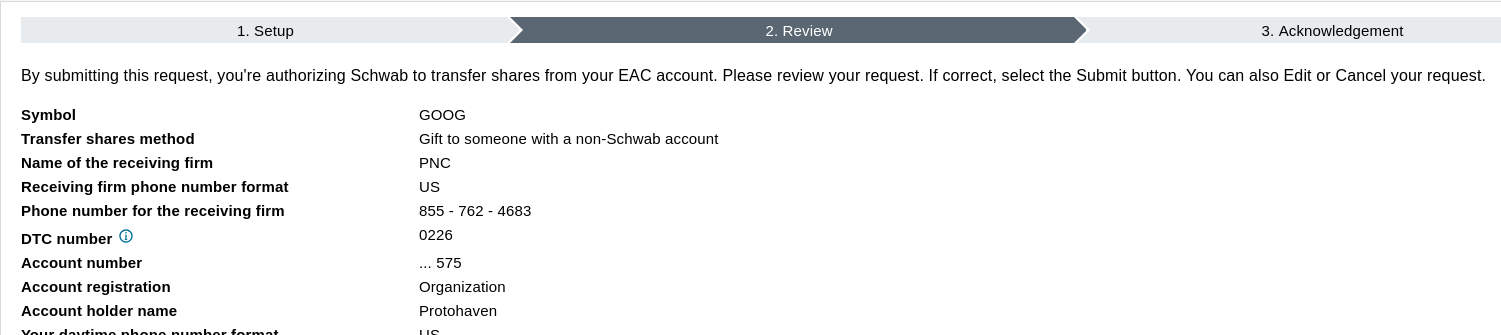
If it all looks good, click "Submit". Make sure to write down the confirmation number for your records in case there's an issue with the transfer.

# Member Meeting Slides & Recordings

2026-05-19

- [slides](https://docs.google.com/presentation/d/1i0Tv21sn4BXwZjKmUsVuh00MrnJgmDQomBWi2i0G1aI/edit?usp=sharing)
- [recording](https://zoom.us/rec/share/RIqWQ6Sp_gJ7rMXxsMDE69AayklWJHw1CXW5pVsbCJlj5ZbXFw4iQ8KY2ku3eUGy.hoD0lqz8Uju3cLfZ) with passcode: XY^TZi=2

2026-02-10

- [slides](https://docs.google.com/presentation/d/1cQJ0ZsgRThwYbClLaO9xzn-SbMEVfK7jcutS8tQOqlU/edit?usp=sharing)
- [recording ](https://zoom.us/rec/share/3IFUqr7wvdTrSzBi3-uCi-frTamXxpKt0dT6G_DB2baDFXsF-U765nCJk7K4W59F.3UM_ith0gfzP2dSE)with passcode: 559?BNus

2025-02-04

<div class="level2" id="bkmrk-slides-recording%C2%A0wit-1">- [slides](https://docs.google.com/presentation/d/1I8WRDvumT39rSGVOPLKas4bYJvLxjtG8CWnpgvFRz_8/edit#slide=id.g2203dc63d97_11_5)
- [recording ](https://zoom.us/rec/share/UnJ8MSYN_RqgWLVA7GFfiRHV-g6ccmyocJ4qyc_s6qvMejPnKPj4CjIb4tJYA1_6.8kK7N8g0sswXM_do?startTime=1738710448000)with passcode: TMzZ1H?E)

</div>2024-11-19

<div class="level2" id="bkmrk-slides">- [slides](https://docs.google.com/presentation/d/1IFKggoeX_ivjfx_MC1YtGf_dRv8XWsivNx68RtaV2SY/edit#slide=id.p)

</div>2024-10-01

<div class="level2" id="bkmrk-all-member-meeting-2">- [slides](https://docs.google.com/presentation/d/1dw_C0SttcqNEtMSkaTEeXTsnTS225ibfY3YmQKSUUp4/edit#slide=id.p)

<div class="li">2024-08-15</div><div class="li">- [slides](https://docs.google.com/presentation/d/1Sa3UhMLN0_Mvd3oySG9OLThCfXaS847HTFKSbwbwAJg/edit#slide=id.g2452ed8f1b5_0_6 "https://docs.google.com/presentation/d/1Sa3UhMLN0_Mvd3oySG9OLThCfXaS847HTFKSbwbwAJg/edit#slide=id.g2452ed8f1b5_0_6")

</div><div class="li">2024-06-04</div><div class="li">- [slides](https://docs.google.com/presentation/d/1JimO0CPqnMVExVyhcoNZPV_jIqmJI-85bhva0e4EID4/edit#slide=id.p "https://docs.google.com/presentation/d/1JimO0CPqnMVExVyhcoNZPV_jIqmJI-85bhva0e4EID4/edit#slide=id.p")

</div><div class="li">2024-05-07</div><div class="li">- [slides](https://docs.google.com/presentation/d/1SB-MnnIOayP1ftfptNkIDtwFHIAz35IP_tg_jg7NSVo/edit?usp=drive_web&ouid=106667818352266772866 "https://docs.google.com/presentation/d/1SB-MnnIOayP1ftfptNkIDtwFHIAz35IP_tg_jg7NSVo/edit?usp=drive_web&ouid=106667818352266772866")

</div><div class="li">2024-04-02</div><div class="li">- [slides](https://docs.google.com/presentation/d/1p4ZQwqN-mj7dlrfNQ6C5CP7cQGXMgerXg5jWqVwnNxU/edit#slide=id.g287cffd6b38_0_103 "https://docs.google.com/presentation/d/1p4ZQwqN-mj7dlrfNQ6C5CP7cQGXMgerXg5jWqVwnNxU/edit#slide=id.g287cffd6b38_0_103")

</div><div class="li">2024-03-05</div><div class="li">- [slides](https://docs.google.com/presentation/d/1llW47PLahrSdEENO7XcF0BpUjUU0ImgikOs0f_XO4iY/edit?usp=sharing "https://docs.google.com/presentation/d/1llW47PLahrSdEENO7XcF0BpUjUU0ImgikOs0f_XO4iY/edit?usp=sharing")

</div><div class="li">2024-02-06</div><div class="li">- [slides](https://docs.google.com/presentation/d/1Krm1oYOluHy18A7Z4zKoN4WqpfjLCJcAlvxgVeKXlME/edit#slide=id.g287cffd6b38_0_85 "https://docs.google.com/presentation/d/1Krm1oYOluHy18A7Z4zKoN4WqpfjLCJcAlvxgVeKXlME/edit#slide=id.g287cffd6b38_0_85")

</div><div class="li">2024-01-09</div><div class="li">- [slides](https://docs.google.com/presentation/d/1rSwzYhQDicCvgvI4rdVKTb_AigVBXejXeEsUVO2Dwbc/edit?usp=sharing "https://docs.google.com/presentation/d/1rSwzYhQDicCvgvI4rdVKTb_AigVBXejXeEsUVO2Dwbc/edit?usp=sharing")

</div><div class="li">2023-12-05</div><div class="li">- [slides](https://docs.google.com/presentation/d/1Ds3Hk1wTgfEKxVfE08ImFL2GRQlBDZRy8oLWvV_oE-Q/edit?usp=sharing "https://docs.google.com/presentation/d/1Ds3Hk1wTgfEKxVfE08ImFL2GRQlBDZRy8oLWvV_oE-Q/edit?usp=sharing")

</div><div class="li">2023-10-04</div><div class="li">- [slides](https://docs.google.com/presentation/d/1YHuq9yQMncLOQC88jrjK-QvfVgE7EdNPpnUGlZTtsxs/edit?usp=sharing "https://docs.google.com/presentation/d/1YHuq9yQMncLOQC88jrjK-QvfVgE7EdNPpnUGlZTtsxs/edit?usp=sharing")

</div><div class="li">2023-09-14</div><div class="li">- [slides](https://docs.google.com/presentation/d/1RNYaF0mQzUE5J765jKCy_I5zZlOVSp9x6UdVQ_8bWOY/edit#slide=id.g181e2d3f2ba_0_63 "https://docs.google.com/presentation/d/1RNYaF0mQzUE5J765jKCy_I5zZlOVSp9x6UdVQ_8bWOY/edit#slide=id.g181e2d3f2ba_0_63")

</div></div>

# Additional Information

# <span style="font-size: 16pt; font-family: Nunito,sans-serif; color: #6ec7e2; background-color: #ffffff; font-weight: 800; font-style: normal; font-variant: normal; text-decoration: none; vertical-align: baseline; white-space: pre-wrap;">Additional Information</span>

## <span style="font-size: 13pt; font-family: Nunito,sans-serif; color: #6d6d6d; background-color: #ffffff; font-weight: bold; font-style: normal; font-variant: normal; text-decoration: none; vertical-align: baseline; white-space: pre-wrap;">Photos and Videos</span>

<span style="font-size: 10pt; font-family: Nunito,sans-serif; color: #6d6d6d; background-color: #ffffff; font-weight: 400; font-style: normal; font-variant: normal; text-decoration: none; vertical-align: baseline; white-space: pre-wrap;">While we encourage folks to take and share photos and videos of the work that they are doing at Protohaven, please be mindful of others in the space. Before taking photos or videos that might include others, you must first get their permission. Be sure to ask if they are okay with you sharing the photos and videos online or in other ways. Please note that Protohaven has interior and exterior cameras and is under video surveillance 24/7.</span>

## <span style="font-size: 13pt; font-family: Nunito,sans-serif; color: #6d6d6d; background-color: #ffffff; font-weight: bold; font-style: normal; font-variant: normal; text-decoration: none; vertical-align: baseline; white-space: pre-wrap;">Insurance</span>

<span style="font-size: 10pt; font-family: Nunito,sans-serif; color: #6d6d6d; background-color: #ffffff; font-weight: 400; font-style: normal; font-variant: normal; text-decoration: none; vertical-align: baseline; white-space: pre-wrap;">While at Protohaven, you are responsible for your own safety. Protohaven is also not responsible for any property damage or loss. It is strongly recommended that members contact their insurance providers to take out a personal articles policy as an add on to their homeowners’ or renters’ policy to cover any damage or loss to property that members might have at Protohaven.</span>

## <span style="font-size: 13pt; font-family: Nunito,sans-serif; color: #6d6d6d; background-color: #ffffff; font-weight: bold; font-style: normal; font-variant: normal; text-decoration: none; vertical-align: baseline; white-space: pre-wrap;">Donations</span>

<span style="font-size: 10pt; font-family: Nunito,sans-serif; color: #6d6d6d; background-color: #ffffff; font-weight: 400; font-style: normal; font-variant: normal; text-decoration: none; vertical-align: baseline; white-space: pre-wrap;">Protohaven does not accept non-monetary unsolicited donations. Anyone interested in donating items to Protohaven should complete this </span>[<span style="font-size: 10pt; font-family: Nunito,sans-serif; color: #1155cc; background-color: #ffffff; font-weight: 400; font-style: normal; font-variant: normal; text-decoration: underline; -webkit-text-decoration-skip: none; text-decoration-skip-ink: none; vertical-align: baseline; white-space: pre-wrap;">form</span>](https://form.asana.com/?k=ahRWpg6Vc6ny13edihwoBQ&d=1199692158232291)<span style="font-size: 10pt; font-family: Nunito,sans-serif; color: #6d6d6d; background-color: #ffffff; font-weight: 400; font-style: normal; font-variant: normal; text-decoration: none; vertical-align: baseline; white-space: pre-wrap;">. Protohaven staff will reach out to the submitter regarding whether or not the organization is willing to accept the items.</span>

## <span style="font-size: 13pt; font-family: Nunito,sans-serif; color: #6d6d6d; background-color: #ffffff; font-weight: bold; font-style: normal; font-variant: normal; text-decoration: none; vertical-align: baseline; white-space: pre-wrap;">Project Requests</span>

<span style="font-size: 10pt; font-family: Nunito,sans-serif; color: #6d6d6d; background-color: #ffffff; font-weight: 400; font-style: normal; font-variant: normal; text-decoration: none; vertical-align: baseline; white-space: pre-wrap;">Protohaven does not offer design and fabrication services or consultations. However, if anyone is interested in contracting Protohaven members, instructors, or volunteers to assist with a project, they can complete this </span>[<span style="font-size: 10pt; font-family: Nunito,sans-serif; color: #1155cc; background-color: #ffffff; font-weight: 400; font-style: normal; font-variant: normal; text-decoration: underline; -webkit-text-decoration-skip: none; text-decoration-skip-ink: none; vertical-align: baseline; white-space: pre-wrap;">form</span>](https://form.asana.com/?k=cIIagi3N2uAwc6HQiknQ8w&d=1199692158232291)<span style="font-size: 10pt; font-family: Nunito,sans-serif; color: #6d6d6d; background-color: #ffffff; font-weight: 400; font-style: normal; font-variant: normal; text-decoration: none; vertical-align: baseline; white-space: pre-wrap;"> and the information will be shared in the #help-wanted channel in Discord. We prefer that anyone being contracted for project assistance is compensated fairly, although the determination of what is considered “fair” is up to the discretion of those interested in assisting with any posted project.</span>

## <span style="font-size: 13pt; font-family: Nunito,sans-serif; color: #6d6d6d; background-color: #ffffff; font-weight: bold; font-style: normal; font-variant: normal; text-decoration: none; vertical-align: baseline; white-space: pre-wrap;">Grievances and Dispute Resolution</span>

<span style="font-size: 10pt; font-family: Nunito,sans-serif; color: #6d6d6d; background-color: #ffffff; font-weight: 400; font-style: normal; font-variant: normal; text-decoration: none; vertical-align: baseline; white-space: pre-wrap;">In the event that you find yourself in a dispute with another member, we ask that you remove yourself from the situation and find a staff member immediately. Protohaven staff will take a statement from all parties involved. The Membership Coordinator will follow up with all parties via email within 24 business hours to outline the next steps and any necessary course of action, which may include mediation.</span>

## <span style="font-size: 13pt; font-family: Nunito,sans-serif; color: #6d6d6d; background-color: #ffffff; font-weight: bold; font-style: normal; font-variant: normal; text-decoration: none; vertical-align: baseline; white-space: pre-wrap;">Three-Strike Rule</span>

<span style="font-size: 10pt; font-family: Nunito,sans-serif; color: #6d6d6d; background-color: #ffffff; font-weight: 400; font-style: normal; font-variant: normal; text-decoration: none; vertical-align: baseline; white-space: pre-wrap;">Protohaven employs a three-strike rule. In the event that any member, guest, volunteer, or instructor violates any of our policies, the following steps will be taken.</span>

- <span style="font-size: 10pt; font-family: Nunito,sans-serif; color: #6d6d6d; background-color: #ffffff; font-weight: 400; font-style: normal; font-variant: normal; text-decoration: none; vertical-align: baseline; white-space: pre-wrap;">First Strike - Written documentation of the incident by Protohaven staff. A written warning will be sent to the offender.</span>
- <span style="font-size: 10pt; font-family: Nunito,sans-serif; color: #6d6d6d; background-color: #ffffff; font-weight: 400; font-style: normal; font-variant: normal; text-decoration: none; vertical-align: baseline; white-space: pre-wrap;">Second Strike - Written documentation of the incident by Protohaven staff. Access to the space will be revoked for one month. A written notification will be sent to the offender.</span>
- <span style="font-size: 10pt; font-family: Nunito,sans-serif; color: #6d6d6d; background-color: #ffffff; font-weight: 400; font-style: normal; font-variant: normal; text-decoration: none; vertical-align: baseline; white-space: pre-wrap;">Third Strike - Written documentation of the incident by Protohaven staff. Access to the space will be revoked indefinitely, or for a period of time determined by Protohaven staff. A written notification will be sent to the offender.</span>

<span style="font-size: 10pt; font-family: Nunito,sans-serif; color: #6d6d6d; background-color: #ffffff; font-weight: 400; font-style: normal; font-variant: normal; text-decoration: none; vertical-align: baseline; white-space: pre-wrap;">Protohaven reserves the right to suspend or revoke membership or access privileges at any time, even if no previous incidents have occurred with the individual in question.</span>