Get Involved
- Internal Communications
- Staff, Volunteers, and Instructors
- Becoming an Instructor
- Donating Stocks and Investment Assets
- Member Meeting Slides & Recordings
Internal Communications
Protohaven uses several methods of internal communication including Discord, email, as well as postings in the shop. Members are expected to check these channels on a regular basis in order to be aware of any important information, updates, or events.
Discord
Protohaven Members enjoy access to our Discord server to connect, share, and learn alongside fellow members. It is designed to be a peer-to-peer resource for all members.
As part of our community, here are some of the channels you have access to:
-
#general to connect and generally chit-chat with one another
-
#buy-and-sell-trade-free to, well, buy and sell, trade, or give away
-
#help-wanted to seek out advice or coordinate project help from other members, and where we post project requests submitted by external and internal community members.
-
#show-and-tell to see and share all the cool things you’re working on both inside and outside the shop!
Access to Discord is provided in our Welcome email, we ask that you look out for a DM from Protohaven admin about associating your Discord with your Protohaven membership.
When joining Discord, we ask that members use their first name and last name as their display name.
Discord Rules
The most up-to-date rules are posted on the #announcements channel in our Discord server.
1. Be Respectful
You must respect all users, regardless of your liking towards them. Treat others the way you want to be treated.
2. No Inappropriate Language
The use of profanity should be kept to a minimum. Any derogatory language towards any user is prohibited.
3. No Spamming
Don't send multiple messages right after each other. Don't disrupt chat by spamming.
4. No Graphic/Adult/Other NSFW material
This is a community server and sharing of such is strictly prohibited.
5. No advertisements
We do not tolerate advertisements outside of #buy-and-sell (which should be focused on member transactions not for soliciting your business). Please share your work in progress in #show-and-tell and request contracted or volunteer work in #help-wanted.
6. Nicknames must match your Protohaven name
You will be required to change your nickname if we can not identify you. Access to all channels outside of "Community Info & News" will be revoked if we cannot identify you. If you have any concerns about your display name, please reach out.
7. Server Raiding
Raiding or mentions of raiding are prohibited.
8. Direct & Indirect Threats
Threats to other users of DDoS, Death, DoX, abuse, and other malicious threats are absolutely prohibited.
9. Follow the Discord Community Guidelines
Can be found here: https://discordapp.com/guidelines
10. Voice Channels
Do not join voice chat channels without permission of the people already in there.
11. Do Not Call
Do not call anyone on our server unless you have prior authorization to do so. Voice/Video calls to Admin, Techs, Board, Instructors, etc, through Discord without prior consent is strictly prohibited. Violators will be permanently removed.
The Admins and Mods will Mute/Kick/Ban per discretion. If you feel mistreated, DM an Admin and we will resolve the issue. Your presence in this server implies accepting these rules, including all further changes. These changes might take place at any time without notice, it is your responsibility to check the #rules channel for any updates.
Staff, Volunteers, and Instructors
Protohaven staff, volunteers, and instructors are key in keeping the organization running smoothly and implementing programs and classes that are in alignment with our mission and core values. Although it is not always feasible, if you need to meet with staff for any reason, it is preferred that you first reach out to set up an appointment.
Executive, Strategic Planning Committee (Board Members)
Responsible for implementation of the strategic plan, identifying partnership, community engagement, and programming opportunities that are in alignment with Protohaven’s mission and core values. Develops strategies and policies necessary to ensure organizational sustainability. Supervises, guides, and supports staff, conducts fundraising activities, and represents Protohaven externally. Any questions related to fundraising, partnerships, or the strategic plan should be directed to this committee.
Membership & Operations Coordinator (Staff)
Responsible for member recruitment, retention, and engagement. Works to identify opportunities to expand Protohaven’s reach in the community and identify potential partnerships. Any questions related to membership, clearances, storage, equipment reservations, member disputes should be directed to this individual.
Education & Programming Committee (Board and Volunteers)
Composed of board members and volunteers, the education committee is responsible for scheduling and posting classes, responding to student and instructor inquiries, reserving equipment for classes, and ordering class supplies. Reach out to education@protohaven.org with any questions related to our course offerings or schedule.
Shop Tech Leads (Volunteers)
Responsible for working with the Executive Director to provide oversight of the Shop Tech program, including onboarding and training new Shop Techs, and identifying projects and maintenance tasks. Shop Tech Leads can be contacted via Discord. It is our policy to not share Shop Tech Lead contact information without their permission.
Shop Techs (Volunteers)
Responsible for assisting with opening and closing the shop, answering questions, leading shop tours, and completing projects and maintenance tasks identified by Shop Tech Leads and/or Protohaven staff. Shop Techs can be contacted via Discord. It is our policy to not share Shop Tech contact information without their permission.
Instructors (Contractors)
Responsible for delivering Protohaven course offerings and working with the Education Coordinator and Executive Director to develop additional courses and workshops that meet the needs of the organization and community. Instructors can be contacted via Discord or the Protohaven general email address below. It is our Policy to not share instructor contact information without their permission.
Opportunities
Apply as a volunteer
Applications are accepted on a rolling basis, and kept on file until we need to fill a position. Applications can be found at https://www.protohaven.org/opportunities/.
Apply as an instructor
Open calls will be posted as needed here: https://www.protohaven.org/opportunities/
Becoming an Instructor
To become an instructor, follow these steps:
-
Apply on our website: https://www.protohaven.org/opportunities/open-call-for-instructors/
-
An education lead at Protohaven will reach out to you
-
Discuss with Education team what you would like to teach and submit a class
-
Submit the details of any new classes you want to teach via our new class template form. Be advised that these classes will require further review before they are taught.
-
Review will consist of a back and forth with a Protohaven education lead to ensure the class meets our mission and safety standards
-
This will be followed by a paid tech pilot, and feedback on the class
-
- Once the class is finalized, we will onboard you as an instructor
- Fill out the New Instructor Registration Form, so we can get your W9, direct deposit info, profile picture, and instructor bio.
-
If you are not already a member, you will be sent a link to set your account password. This will allow you to log into your Protohaven account and the Instructor Dashboard.
-
Once you have been onboarded you will have access to the following:
- The Instructor's Handbook on our Wiki
-
The #instructors Discord channel (join our server here).
-
For Teaching classes:
-
Familiarize yourself with Classes, (Supplies, Running a Class, Creating a new class, and Modifying an existing class) as well as the materials and tools that will be involved in your classes.
- Follow the Scheduling steps to schedule your classes.
-
Coordinate with the education leads to get access to our class supply room (via the August app)
-
After you teach your class, log your hours and the clearances students earned in the Log Hour & Clearance Form. A link to this form is also found in your Instructor Dashboard. This is how you get paid, and how students get their clearances added to their accounts.
-
Profile Status (on Dashboard)
When you sign in to the Instructor Dashboard, your profile on the left side of the page includes a "Status" section. This will potentially highlight actions you need to take:
- Capabilities - when not "OK", this means that your capabilities haven't been logged. Reach out to education@protohaven.org
- Paperwork - when not "OK", specific documents will be listed as missing. Submit the Instructor Registration form to remedy this.
- Discord - when not "OK", it's likely your discord username isn't linked to your Neon account. Mention this in the #instructors channel of Discord and an admin (probably Scott) will link things up.
- Availability - when not "OK", this indicates that your availability cannot be found in the instructor availability calendar. Make sure you are using your full name (as listed on the instructor dashboard) when setting your availability, and contact education@protohaven.org if you have access or setup issues.
Donating Stocks and Investment Assets
Overview
TODO
Charles Schwab Equity Awards
- Go to your Equity Awards account
- Click the "Transfer Shares" link on the quick access panel
- Select the symbol of share to transfer, then select "Gift to someone with a non-Schwab account". A list of your stocks will appear.
- Set the quanitities of individual stocks to transfer. Once you've selected your stocks, scroll down and fill out the form with the following information:
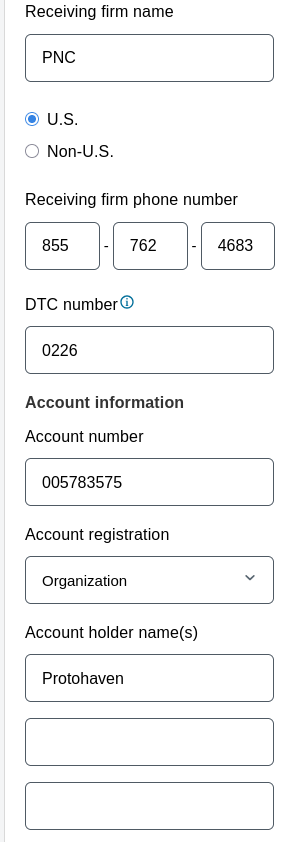
- Receiving firm name: PNC
- U.S.
- Receiving firm phone number: 855-762-4683
- DTC number: 0226
- Account number: 005783575
- Account registration: Organization
- Account holder name(s): Protohaven
Double- and triple-check the account number and DTC code. If these are incorrect, the shares may not transfer or transfer somewhere else!
5. Fill out the remaining (personal) information on the submission form, then click "Submit". You'll have one final chance to confirm everything, like so:
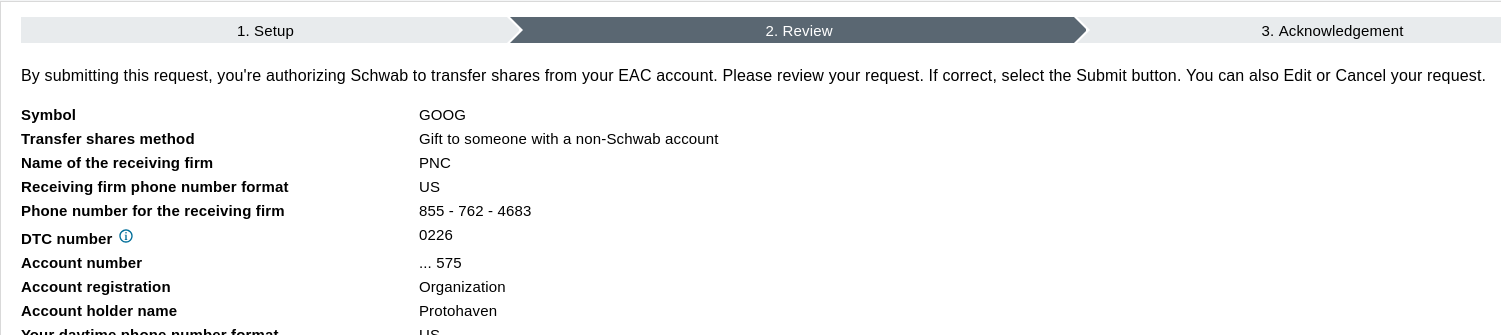
If it all looks good, click "Submit". Make sure to write down the confirmation number for your records in case there's an issue with the transfer.
Member Meeting Slides & Recordings
2026-09-22
2026-05-19
2026-02-10
2025-02-04
2024-11-19
2024-10-01