Safety
- Check fire extinguishers
- Check First Aid Kits for low levels of supply
- Check workshop outlets
- Clean welding helmets and jackets
- Clean/sanitize safety glasses & hearing protection
- Flush Eye Wash Station (Monthly)
- CO Detector, Smoke Detector, and Thermostat Testing
- Test emergency lighting
- Welding fume extractor - check filter
Check fire extinguishers
Fire extinguishers are located in the following areas:
- Kitchen
- Wood Shop
- Maintenance Room
- Blacksmithing
- Front Entrance
For each fire extinguisher:
- Verify that all fire extinguishers are pressurized (indicator is in the green range).
- Verify that they are within their inspection time frame.
If any fire extinguishers within a year of being out of inspection, file a tool report to handle retesting/replacement.
Tool report: https://airtable.com/appbIlORlmbIxNU1L/shrluff2WSzy8c3xd
Check First Aid Kits for low levels of supply
Check the inventory for the first aid kits. Restock any low supplies; backstock is stored in Custodial. Submit purchase requests if anything is needed - especially bandages as they disappear quickly.
There are three first aid kits - one each in the Kitchen, Woodshop, and Forge.
Purchase request: https://protohaven.org/purchasing
Check workshop outlets
Check all electrical outlets on ceiling drops and floor runs for loose outlets and/or cable clamps, improper use of "punch-out" junction boxes, or improper use of "power strips" not installed and used in accordance with instructions included in the listing, labeling or certification.
If you find any loose parts on the outlet drops, submit a maintenance request.
Maintenance request: https://airtable.com/appbIlORlmbIxNU1L/shrluff2WSzy8c3xd
Clean welding helmets and jackets
Gloves
Inspect gloves. Put in a purchase request for any pairs that have holes or excessive wear (don't throw them out until we have replacements)
Purchase request: https://protohaven.org/purchasing
Helmets
- Make a purchase request if the helmet is nonfunctional:
- If there are holes or excessive wear
- If the head strap is broken
- If the lens is difficult to see through
- Confirm the helments auto-darken - shine a phone light on them or take them into direct sunlight
- Wipe surfaces with a damp cloth
Jackets
- Inspect and report any holes, wear, or more than 3 missing buttons
- If any are excessively dirty, file a tool report so they can be machine washed (warm water, regular detergent, high water level)
Clean/sanitize safety glasses & hearing protection
Materials
For a disinfectant, you can use:
- Sanitizing wipes (kept in the maintenance closet)
- Sanitizing spray (kept under the kitchen sink, with refills in the maintenance closet)
- Alcohol
Apply disinfectant, wait three minutes, then wipe with a clean cloth or paper towel.
If we are out of disinfectant, submit a purchase request:
Purchase request: https://protohaven.org/purchasing
Task List
Clean the safety glasses and hearing protection in all of the following areas:
- Left of the the door by the kitchen.
- Left of the door by the textiles/electronics in the studio.
- Left of the door in the wood shop.
- Hanging off the caddies in the wood and general metals areas.
Flush Eye Wash Station (Monthly)
Run the eyewash station for 1-3 minutes. (This flushes any stagnant water from the line.)
CO Detector, Smoke Detector, and Thermostat Testing
The carbon monoxide detector is a small white plastic device located on the interior wall of the custodial room just to the right of the door.
Test CO Detector
Tool report: https://airtable.com/appbIlORlmbIxNU1L/shrluff2WSzy8c3xd
Vacuum CO Detector Grate
Use a shop vac to vacuum out any debris from the plastic grate on the carbon monoxide detector.
Do not use the shop vac assigned to the jewelry area. (The jewelry area shop vac should only be used for metals.)
Test Smoke Detectors
- Announce on the discord #general channel that fire alarms will be tested
- Alert all members in the shop that fire alarms will be tested
- Test each fire alarm by pressing the "test" button - this will produce several loud beeps:
- One in the conference room
- One in each bathroom
- One above the electronics bench in the studio
- One in the design classroom
- One in the staff room
- One in the custodial room
- For any alarms that fail to test, replace their battery, retest, and file a tool report (tagging the "Facilities" tool) with details.
Check Thermostat Backup Batteries
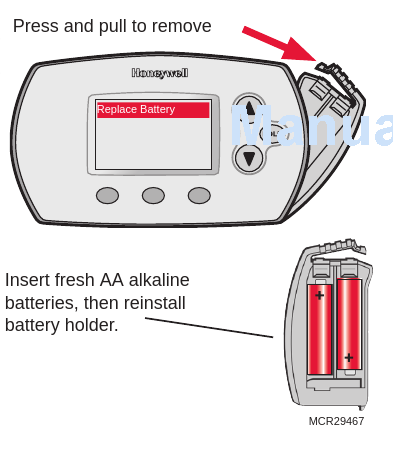
Each of our thermostats contain two AA batteries.
For each of our four thermostats (two in the back shop, one in the studio by the woodshop door, one inside the conference room behind the TV):
- Check each thermostat to see if the REPLACE BATTERY indicator is flashing.
- Open the battery case following the image below and inspect the battery and terminals. If you see corrosion, carefully remove and dispose of the existing batteries, then use 220 grit sandpaper to clean the terminals (if they're corroded)
- The back shop thermostats are covered with a locked protective case. The keys to this case are in the drawer of the black rolling cart next to the front desk. A spare set are located in the keybox on the wall of the Graphics studio; the password is in Vaultwarden on the front desk PC.
- If the "replace battery" indicator is flashing, replace the batteries - there are spares in the class supply room.
- If this is the first time this task is completed this year, replace the batteries regardless of the indicator.
- Ensure the clock is set to the correct time - see honeywell_manual.pdf
- Ensure the battery holder is properly closed and any safety covers are returned and locked.
Test emergency lighting
Test Emergency Lighting
Turn off breaker 13 in panel A. (This breaker powers the emergency lighting.)
With the breaker off, confirm emergency lights are working in the following areas:
- by the bathrooms
- in the studio / front half of the building
- in the woodshop
- in the forge / loading bay
If any lights are not working, create a new tool report.
Tool report: https://airtable.com/appbIlORlmbIxNU1L/shrluff2WSzy8c3xd
Welding fume extractor - check filter
Service Fume Extractor Filter
- Check the filter gauge at the base of the machine.
- If the gauge indicates replacement is needed, fetch (or purchase request) a new one and swap the old one out.
Purchase request: https://protohaven.org/purchasing